
You are using an out of date browser. It may not display this or other websites correctly.
You should upgrade or use an alternative browser.
You should upgrade or use an alternative browser.
REPORT 1.5 MOBILE ISSUES HERE! (UPDATED FEB 20)
- Thread starter Magically Clueless
- Start date
- Status
- Not open for further replies.

greyliances
Tiller
Type of phone: iPad Pro (12.9-inch) (5th generation) iPadOS 16.3 (20D5024e)
Details of your issue: Pathfinding issues for getting in&out of the Parrot Express. (If the path isn’t a straight line)
Screenshots/video: https://youtu.be/DOCqc3V6Blc
Details of your issue: Pathfinding issues for getting in&out of the Parrot Express. (If the path isn’t a straight line)
Screenshots/video: https://youtu.be/DOCqc3V6Blc
Danield2580
Cowpoke
Hi! One bigger bug and a few smaller ones - I’m on iPad Pro 12.9
Bigger bug, GAME LOCKS, CHARACTER STUCK IN PLACE: twice now when dismounting horse and digging up an artifact spot in winter my character froze - I was still able to select different items from my toolbar and even scroll through it, but I couldn’t move in the game. The time was paused and flashing. EDIT: it just froze in the same way while chopping hardwood stumps on the forest farm, in the upper area of stumps.
UPDATE: these problems still happen after the 1.5.6.32 patch update - the second spot I hoed froze me
Smaller ones:
1. Accessing the autograbber in the coop seems to be touchy the same way dismounting the horse is, it tends to take a few tries - strangley, the barn doesn’t seem to have that issue.
2. Same as 1 but the door to Sandy’s shop
3. The text on the TV moves more slowly than it used to
4. The toolbar and date are visible during the Mermaid Show (see photo)
Bigger bug, GAME LOCKS, CHARACTER STUCK IN PLACE: twice now when dismounting horse and digging up an artifact spot in winter my character froze - I was still able to select different items from my toolbar and even scroll through it, but I couldn’t move in the game. The time was paused and flashing. EDIT: it just froze in the same way while chopping hardwood stumps on the forest farm, in the upper area of stumps.
UPDATE: these problems still happen after the 1.5.6.32 patch update - the second spot I hoed froze me
Smaller ones:
1. Accessing the autograbber in the coop seems to be touchy the same way dismounting the horse is, it tends to take a few tries - strangley, the barn doesn’t seem to have that issue.
2. Same as 1 but the door to Sandy’s shop
3. The text on the TV moves more slowly than it used to
4. The toolbar and date are visible during the Mermaid Show (see photo)
Last edited:
Cervianna Star
Newcomer
phone: Galaxy A51
Issue: Not really an issue but there are lines on some items. The last version had an emergency save where if the game crashes, it would still be able to return to where you left off but now it doesn't, it only returns to when you saved manually.
Update: I updated to the latest fix. I can't press the "X" or exit button, it just puts me back to the menu. Random lines appear too.
Issue: Not really an issue but there are lines on some items. The last version had an emergency save where if the game crashes, it would still be able to return to where you left off but now it doesn't, it only returns to when you saved manually.
Update: I updated to the latest fix. I can't press the "X" or exit button, it just puts me back to the menu. Random lines appear too.
Attachments



Last edited:

StardustMacaron
Greenhorn
iPhone 13 Pro max
Fishing reel sound continues to play even after I exit out of fishing
I’ve noticed a couple of bugs that others have pointed out already -
1: the fishing reel sound gets stuck until I close and reopen the game.
I’m playing on iPad gen 9.
Seconding the fishing sound. Playing on an iPhone 12 Pro. (Seems like everyone with this issue is on iOS.)
Hello, today I encountere some weird issues after the update.
Type of phone: Apple Ipad Air (5th Generation)
3. weird ticking sound over background music (really annoying) - unfortunately I can‘t attach the video for the sound….
I suspect this may also be the fishing sound, since it does sound like a ticking noise.

MacLoff
Greenhorn
Type of phone: Galaxy Tab A8 (SM-X200)
Details of your issue: 1- The menus, dialogue boxes (in portuguese) and fish catching minigames are out of scale looking small even in the 10,4" screen and there's no how to get them bigger. In the previous 1.4.x version they looked bigger and more comfortable to read and play.
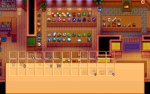
2 - When donating artifacts to the museum, the inventory box turns transparent and all the items get bugged so it's difficult to find and select the artifact or mineral.
Screenshots:


Details of your issue: 1- The menus, dialogue boxes (in portuguese) and fish catching minigames are out of scale looking small even in the 10,4" screen and there's no how to get them bigger. In the previous 1.4.x version they looked bigger and more comfortable to read and play.
2 - When donating artifacts to the museum, the inventory box turns transparent and all the items get bugged so it's difficult to find and select the artifact or mineral.
Screenshots:
Attachments
Last edited:
SnookumsOwO
Greenhorn
Type of phone: vivo 1935
Bug(s) details:
Bug(s) details:
- Game lags everytime I enter or leave my house.
- Toolbar UI is huge at the start of the game (can be fixed when entering setting and leave again)
- Joypad buttons are placed incorrectly (can be fixed by adjusting the joypad controls in the settings)
- Stacking is broken, some items just straight up gone when stacked)
rmctagg
Newcomer
Bug: can no longer listen to audio from another app at the same time (specifically audible).
Prior to the update, launching the app would cause other audio to fade out, but I could swap to the audible app to press play and then go back into Stardew without issue. Now, if I do that, as soon as I go back into Stardew the screen is completely frozen and the app needs to be force crashed.
Prior to the update, launching the app would cause other audio to fade out, but I could swap to the audible app to press play and then go back into Stardew without issue. Now, if I do that, as soon as I go back into Stardew the screen is completely frozen and the app needs to be force crashed.
clarap94
Greenhorn
Type of phone: galaxy z flip4
Details of your issue:
-The size of the toolbar and the weather box cannot be adjusted.
-It looks too big every time it starts.
Screenshots/video: (highly encouraged)
Details of your issue:
-The size of the toolbar and the weather box cannot be adjusted.
-It looks too big every time it starts.
Screenshots/video: (highly encouraged)
Attachments


Ylost
Newcomer
Hello, I am a Spanish-speaking gamer so my English is not very good, I hope this statement can be understood, I was fishing in a new account created to test 1.5 and I realized that when you are fishing if you enlarge the screen the vision of the fishing mini game is also enlarged, the same happens when you move away, it is also a bit annoying because it is difficult to cast the rod with the screen away.
Paperv
Newcomer
device: IPad Air 4th gen
Same bug as rcmtagg - no in game audio, and restarting my own audio via the control centre causes Stardew Valley to freeze and need to be force-closed. I can swipe up so go back to the Home Screen and restart my audio that way without crashing STV, but the audio is immediately stopped on reopening the game.
Its not just an incompatibility with audible - I’ve tested it with other apps including Libby, music and others.
Same bug as rcmtagg - no in game audio, and restarting my own audio via the control centre causes Stardew Valley to freeze and need to be force-closed. I can swipe up so go back to the Home Screen and restart my audio that way without crashing STV, but the audio is immediately stopped on reopening the game.
Its not just an incompatibility with audible - I’ve tested it with other apps including Libby, music and others.
Mischief
Newcomer
Type of phone:
Xiaomi Poco F3, Android 12
Details of your issue:
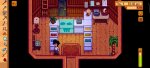
Invisible Willy. It's the 4th day of Spring 1 and I went into Willy's shop to sell the foraged clams. Willy wasn't there but I can access the shop.
Screenshots/video:
mp4 vid is not supported so I hope the screenshot will be sufficient.
Any other info that might be relevant:
I restarted the game and Willy was there.
P.S. thank you for the 1.5 update and the patches released already.
Xiaomi Poco F3, Android 12
Details of your issue:
Invisible Willy. It's the 4th day of Spring 1 and I went into Willy's shop to sell the foraged clams. Willy wasn't there but I can access the shop.
Screenshots/video:
mp4 vid is not supported so I hope the screenshot will be sufficient.
Any other info that might be relevant:
I restarted the game and Willy was there.
P.S. thank you for the 1.5 update and the patches released already.
Attachments


NannyO
Cowpoke
iPad pro dec 2022. I have the same issue. The fridge opens but tapping any of the eggs has no response.Phone: iPad Pro 2020
Problem: When trying to complete "Gus' Famous Omelette" you can't transfer eggs from your inventory to the fridge in Gus' pub. You can't interact with anything once the inventory opens up.
Whee
Newcomer
Type of phone: galaxy S20
Details of your issue:
1) When my character opens the mailbox, the game turns off.
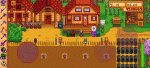
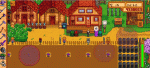
2) It works well inside the house, but the game turns off when my character leaves the house. According to the information on my cell phone, it keeps stopping. I added crops using SMAPI, and I think this is related.
Screenshots/video: I attached a gif because I thought it would be faster to watch it through a video.
Any other info that might be relevant: I added crops using smapi, and I think it had an relevant.
Details of your issue:
1) When my character opens the mailbox, the game turns off.
2) It works well inside the house, but the game turns off when my character leaves the house. According to the information on my cell phone, it keeps stopping. I added crops using SMAPI, and I think this is related.
Screenshots/video: I attached a gif because I thought it would be faster to watch it through a video.
Any other info that might be relevant: I added crops using smapi, and I think it had an relevant.
Attachments
pelicantowns
Newcomer
Type of phone: iPad air 4
Details of your issue: App is crashing everytime i harvest honey. happened thrice already.
*edit: game is crashing everytime i open it. i cannot play at all already updated to the latest patch
video in the link: https://twitter.com/613koshi/status/1612074057167687681?s=61&t=ty9zCzUGJ2WUjRnbuSGPWw
Details of your issue: App is crashing everytime i harvest honey. happened thrice already.
*edit: game is crashing everytime i open it. i cannot play at all
already updated to the latest patchvideo in the link: https://twitter.com/613koshi/status/1612074057167687681?s=61&t=ty9zCzUGJ2WUjRnbuSGPWw
Last edited:
Mystique489
Newcomer

- Status
- Not open for further replies.
Similar threads
- Replies
- 0
- Views
- 229

- Replies
- 0
- Views
- 261
- Replies
- 1
- Views
- 276

- Replies
- 2
- Views
- 3K

- Replies
- 0
- Views
- 334