REPORT 1.5 MOBILE ISSUES HERE! (UPDATED FEB 20)

Status
Not open for further replies.
Type of Phone: Galaxy Tab s7+ SM-T970 + playing with an xbox controller
Details of the issue: While placing furniture an input delay is missing, always causing furnature (which can be picked up in one button press) to flicker between placed and unplaced (Shrödinger's Furnature). Therefore its chance if the furnature is placed or not.

I loaded the game through the load menu.
 
Type of phone: iPad Pro 11, iOS
Details of your issue: I am unable to use the forge. I have tried combining the two rings and although the small square lights up I can’t place the rings. I checked to make sure I had the proper amount of shards but I still can’t combine the rings. Same thing happens with weapons and Galaxy Souls.
On the day of your issue, did you load your game through the Load Game menu (you wake up in the bed)? I used the Load Game Menu.
Any other info that might be relevant: I have all of the updates. All problems have been fixed. This is the only issue I seem to have.
 
Type of phone: iPad 8th generation iOS
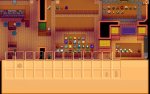
Details of your issue: My inventory is offset while donating dried starfish to museum
Screenshots/video:
3C65B454-3CE6-41E6-927B-3BB730BBE1A9.png

On the day of your issue, did you load your game through the Load Game menu (you wake up in the bed)? Or was it an "emergency load" (i.e. one where you start mid-day wherever you left off)? Emergency Load
Any other info that might be relevant: First donation of the save
i
 

Attachments

  • 3C65B454-3CE6-41E6-927B-3BB730BBE1A9.png
    3C65B454-3CE6-41E6-927B-3BB730BBE1A9.png
    626.8 KB · Views: 812
Last edited:
Type of phone: iPad 8th generation iOS
Details of your issue: My screen goes black once in a while and I have to exit the app to undo it
Screenshots/video:
66C4356E-2BD5-4EF0-80EA-0CCEE8B862AA.png


On the day of your issue, did you load your game through the Load Game menu (you wake up in the bed)? Or was it an "emergency load" (i.e. one where you start mid-day wherever you left off)? Emergency Load
Any other info that might be relevant:
 
1674856362585.png

Type of phone: iPhone 13 Pro Max
Details of your issue: The highlight or colored is where I can't access is, I have problems with how my screen size is not adjustable, and not being able to play the game. The
Screenshots/video:
(highly encouraged)
On the day of your issue, did you load your game through the Load Game menu (you wake up in the bed)? Or was it an "emergency load" (i.e. one where you start mid-day wherever you left off)? I download the game, deleted and made a new load, I think this is purely the setting.
Any other info that might be relevant:
None
 
Type of phone: Samsung Galaxy A12
Details of your issue: Started with sporadic access to the Crafts room bundle in the Community centre. I have 4 bundles in the craft room complete but now I can't access it at all.
Screenshots/video:
On the day of your issue, did you load your game through the Load Game menu (you wake up in the bed)? Or was it an "emergency load" (i.e. one where you start mid-day wherever you left off)? Standard game loading
Any other info that might be relevant: none
 
If you keep going to load a save or create a new game and come back to the menu the Junimos and the alien door will move out from they original place
Screenshot_20230127-152801.jpg
Screenshot_20230127-153047.jpg
Screenshot_20230127-153433.jpg
Screenshot_20230127-154050.jpg
 

Attachments

  • Screenshot_20230127-152852.jpg
    Screenshot_20230127-152852.jpg
    93 KB · Views: 228
  • Screenshot_20230127-152916.jpg
    Screenshot_20230127-152916.jpg
    93.9 KB · Views: 297
  • Screenshot_20230127-153211.jpg
    Screenshot_20230127-153211.jpg
    92.2 KB · Views: 331
  • Screenshot_20230127-153327.jpg
    Screenshot_20230127-153327.jpg
    91.5 KB · Views: 245
  • Screenshot_20230127-153501.jpg
    Screenshot_20230127-153501.jpg
    91.2 KB · Views: 316
👋 Hiya Thank you for Update. I am experiencing a few Issues. I am using a Samsung Galaxy7 Tablet. See attached Screenshots
 

Attachments

  • Screenshot_20230127_202558.jpg
    Screenshot_20230127_202558.jpg
    56.3 KB · Views: 314
  • Screenshot_20230127_201913.jpg
    Screenshot_20230127_201913.jpg
    117.2 KB · Views: 265
When I go fishing, occasionally the reeling sound will continue to play after catching the fish. I’ve managed to get two different sounds stuck at once. The only way to resolve this and get the sound to stop is to save and completely close the app. I’m on iPad Pro, 16.3 iOS. Stardew update 1.5.6.37.

Other notables: Donating items to the museum will cause the screen to move in a funky spot. Fishing bar is still very very small.
 
Device: Realme 5pro

Hi can anyone explain why i can't play my save? Im playing on mobile tried clearing data the app itself. Im on 1.5.6.37. This occurred within this day itself after i close the game after i got back this thing occurred cannot contro anything and when i zoom in it focuses on the shrine of grandad.


Last edited:
Device: Pixel 7

It seems like standing in front of Leo after jumping off my horse caused him to duplicate. The following day, a couple of the NPCs were hanging out in a weird spots. Lewis was outside on the pier.


Leo duplicated again, but this time I wasn't jumping off the horse.
 

Attachments

  • Screenshot_20230127-222110.png
    Screenshot_20230127-222110.png
    454.6 KB · Views: 272
Missing feature from the previous update
(It exists before in mobile)
Current version: 1.5.6.37
20230128_105528.jpg
20230128_110135.jpg

From the pc (havent added yet)
20230128_112613.jpg
20230128_112630.jpg
 
Last edited:
Type of phone: iPhone 12 Pro 128 gb
Details of your issue: the sound of the fishing reel pulling will continue after i’m done fishing, and will even continue into the next day. going back to the main menu doesn’t stop it either, i have to manually force close and reload the app. this has happened on multiple days, it doesn’t start the first time i fish, only after multiple casts
On the day of your issue, did you load your game through the Load Game menu (you wake up in the bed)? Or was it an "emergency load" (i.e. one where you start mid-day wherever you left off)? through load game menu
 
Type of device: iPad Air (4th Gen) iOS 16.2 (game app fully updated to most recent version)

Details of your issue: in Winter Year 1, the heater disappeared from my coop after upgrading from Coop to Big Coop. I tried reloading without saving and reloading to previous save and the heater was still gone. I had to buy another one as it was nowhere to be found.

Type of load: Both types were tried and neither restored the heater to the coop.

i am close to upgrading the barn. I will see if the same thing happens with that building upgrade as well.
 
I've updated the latest version, but the problem of me getting up every day and re-choosing my class is still not solved, and the sound of pulling the rod after quitting fishing will continue until you close the game. Device: iphoneX
 
Type of Phone: Galaxy Tab s7 SM-T970
Details of the issue: There is no way to pick up paintings or windows, using solely buttons.
With touch-to-interact-controls it works fine.

I loaded the game through the load menu.
 
Type of phone: iPhone 14 Pro
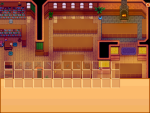
Details of your issue: The Volcano Forge does not work. I am unable to drag and drop my weapons/tools/gems into the slots. The box lights up but the weapon/tool/gem never drops in. Seems like a few others are experiencing this issue too.
Screenshots/video: Attached
On the day of your issue, did you load your game through the Load Game menu (you wake up in the bed)? Or was it an "emergency load" (i.e. one where you start mid-day wherever you left off)? Load Game menu
Any other info that might be relevant: I have downloaded the latest update
 

Attachments

  • image.jpg
    image.jpg
    78.4 KB · Views: 342
Ipad air4 update 37

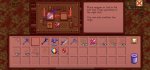
I can't make clothes out of Magic Rock Candy and squid Ink Ravioli.
 

Attachments

  • 71BF98A3-DAFC-4CE1-86BD-EF26BA455935.png
    71BF98A3-DAFC-4CE1-86BD-EF26BA455935.png
    264.3 KB · Views: 270
Status
Not open for further replies.
Back
Top