
You are using an out of date browser. It may not display this or other websites correctly.
You should upgrade or use an alternative browser.
You should upgrade or use an alternative browser.
REPORT 1.5 MOBILE ISSUES HERE! (UPDATED FEB 20)
- Thread starter Magically Clueless
- Start date
- Status
- Not open for further replies.
Shel89
Newcomer
Samsung Galaxy Tab E,
I seem to be experiencing consistent crashing during cut scenes or when entering the museum. This was a problem on a different tablet(iLife K3102) I was using as well. It doesn't seem to matter if I load a game fresh or if I wake up and go on.
This issue doesn't seem to be happening on my Huawei P Smart 2018 model.
I seem to be experiencing consistent crashing during cut scenes or when entering the museum. This was a problem on a different tablet(iLife K3102) I was using as well. It doesn't seem to matter if I load a game fresh or if I wake up and go on.
This issue doesn't seem to be happening on my Huawei P Smart 2018 model.
jeffreycheng23
Greenhorn
Type of phone: iPhone 11
Details of your issue: Another bug -- cannot choose a profession when upgrading. The selection window pops up every next day.
Screenshots/video:
Details of your issue: Another bug -- cannot choose a profession when upgrading. The selection window pops up every next day.
Screenshots/video:
Indra067
Newcomer
Type of phone: Redmi Note 7
Details of your issue: I was reforging my weapon and remembered about the ability to change your weapon appearance, but apparently it doesn't work? I followed all and every instruction about to done so, but it did not work at all...
It was from the load game menu, continuing from where i left off.
For a little detail, the Forge box DOES lit up when i want to put the second weapon in like in the instruction but somehow it just rejects it?
Details of your issue: I was reforging my weapon and remembered about the ability to change your weapon appearance, but apparently it doesn't work? I followed all and every instruction about to done so, but it did not work at all...
It was from the load game menu, continuing from where i left off.
For a little detail, the Forge box DOES lit up when i want to put the second weapon in like in the instruction but somehow it just rejects it?
Roseforme
Newcomer
Type of phone: iPad 11 pro
Details of your issue: Everything is very small. Text during dialog, spacing in the inventory menu. Would love to be able to adjust sizing.
On the day of your issue, did you load your game through the Load Game menu (you wake up in the bed)? Or was it an "emergency load" (i.e. one where you start mid-day wherever you left off)? I first started mid-day but reloaded a previous save. I also wanted to make sure I was on the current version and updated the app but the sizing was still an issue.
Details of your issue: Everything is very small. Text during dialog, spacing in the inventory menu. Would love to be able to adjust sizing.
On the day of your issue, did you load your game through the Load Game menu (you wake up in the bed)? Or was it an "emergency load" (i.e. one where you start mid-day wherever you left off)? I first started mid-day but reloaded a previous save. I also wanted to make sure I was on the current version and updated the app but the sizing was still an issue.

Wonderstruck
Greenhorn
Type of phone: Oppo A5S,
Game Version: 1.5.6.35
Details of your issue: It's very inconsistent, and I have trouble replicating it, but sometimes when you're tapping to move and you click on the toolbar or the button to open the game menu, you get stuck in a black screen with a bugged toolbar UI. I'm not sure if that's even the cause.
Screenshots/video:

On the day of your issue, did you load your game through the Load Game menu (you wake up in the bed)? Or was it an "emergency load" (i.e. one where you start mid-day wherever you left off)?
It happened either way.
Any other info that might be relevant: I do remember that before one of the updates, clicking on the menu to open the inventory while tapping to move would inconsistenly crash me as well, but that do
Game Version: 1.5.6.35
Details of your issue: It's very inconsistent, and I have trouble replicating it, but sometimes when you're tapping to move and you click on the toolbar or the button to open the game menu, you get stuck in a black screen with a bugged toolbar UI. I'm not sure if that's even the cause.
Screenshots/video:
On the day of your issue, did you load your game through the Load Game menu (you wake up in the bed)? Or was it an "emergency load" (i.e. one where you start mid-day wherever you left off)?
It happened either way.
Any other info that might be relevant: I do remember that before one of the updates, clicking on the menu to open the inventory while tapping to move would inconsistenly crash me as well, but that do
reveurillusoir
Greenhorn
Device: iPad Pro 2nd gen, ios 15.7.2 , using a bluetooth controller.
Issue: Game freezes at random, requiring restarting the app and losing any unsaved progress. Tools can still be selected and certain animations like water ripples continue but time stops and no inputs are accepted. Happens most frequently while mining but also happens while doing anything else, always upon using a tool or picking up an item.
Issue: Game freezes at random, requiring restarting the app and losing any unsaved progress. Tools can still be selected and certain animations like water ripples continue but time stops and no inputs are accepted. Happens most frequently while mining but also happens while doing anything else, always upon using a tool or picking up an item.
amapanda
Newcomer
Type of phone: Galaxy S20+ 5G
Details of your issue: I can collect my eggs without issue, but placing them into my mayonnaise machines is difficult-to-impossible. I was able to place 3 after 3-6 taps on mayo machines on my touch screen, but the 4th egg remains selected in my inventory after dozens of attempts. It appears I can easily attempt to eat it, but the machine will not take it, though it certainly appears empty.
On the day of your issue, did you load your game through the Load Game menu (you wake up in the bed)? Or was it an "emergency load" (i.e. one where you start mid-day wherever you left off)? Load Game menu start
Any other info that might be relevant: I updated to the very latest version on the Play store right before I reopened and loaded my game.
This is a game I had 60 hours on before the 1.5 update.
Details of your issue: I can collect my eggs without issue, but placing them into my mayonnaise machines is difficult-to-impossible. I was able to place 3 after 3-6 taps on mayo machines on my touch screen, but the 4th egg remains selected in my inventory after dozens of attempts. It appears I can easily attempt to eat it, but the machine will not take it, though it certainly appears empty.
On the day of your issue, did you load your game through the Load Game menu (you wake up in the bed)? Or was it an "emergency load" (i.e. one where you start mid-day wherever you left off)? Load Game menu start
Any other info that might be relevant: I updated to the very latest version on the Play store right before I reopened and loaded my game.
This is a game I had 60 hours on before the 1.5 update.

buttonmasher
Newcomer
Device: Redmi note 8 pro
Version: 1.5.6.36
Details of issue: graphics issue (there are some line on the river and leaf)
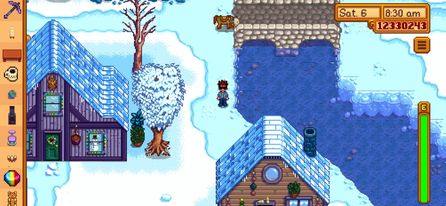
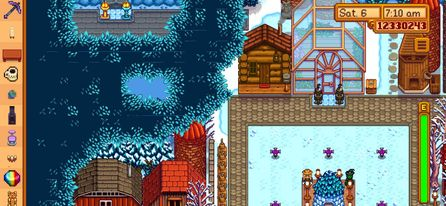
Version: 1.5.6.36
Details of issue: graphics issue (there are some line on the river and leaf)
Saloonatic
Greenhorn
I no longer appear able to craft on ipad. I have updated all updates, restarted ipad, and tried the backup save. Recently, I completed the boat at Willys and completed the 25 recipe achievement. This is for all craftable options, not just iridium sprinkler.
Attachments

Chiefersoze
Tiller
Device: Poco X3 Pro
Version: 1.5.6.36
Details of issue: I can't still can't harvest my mayonnaise machine, cheese press or preserves jar, cask and keg if its placed on the edge of the cellar or big shed.
On the big shed I can't still harvest my products if its placed on the lower left line near the door of the shed. I still need to zoom in order to harvest my items. If I zoom out I can't harvest it, on my items
On the cellar I can't still harvest my wine on casks placed on the bottom border of the cellar, again I still need to zoom in order to harvest the wine.
The hitbox was "fixed" on the last update, what I meant is when you zoom at certain levels you can harvest the item, and at the farthest draw range you can't still harvest your items
Version: 1.5.6.36
Details of issue: I can't still can't harvest my mayonnaise machine, cheese press or preserves jar, cask and keg if its placed on the edge of the cellar or big shed.
On the big shed I can't still harvest my products if its placed on the lower left line near the door of the shed. I still need to zoom in order to harvest my items. If I zoom out I can't harvest it, on my items
On the cellar I can't still harvest my wine on casks placed on the bottom border of the cellar, again I still need to zoom in order to harvest the wine.
The hitbox was "fixed" on the last update, what I meant is when you zoom at certain levels you can harvest the item, and at the farthest draw range you can't still harvest your items
Attachments


Last edited:
kerrysqueaky72
Greenhorn
Well now I look up if each quest has a bin I have to put stuff into and I just don’t pick it. I was just looking up the hardwood one So now I know not to do it thank you!I’m having the same issue. I tried the one with Gus’s eggs and the one with the hardwood. Both times after collecting everything it wouldn’t allow me to move the items into the fridge or log storage pile.
kerrysqueaky72
Greenhorn
Oh that’s smart! I don’t think I’m that digitally savvy thoughI have found a work around as this issue seems to only affect tablets. I transfer my game files over to my iPhone to complete drop off for these quests… then transfer the files back to iPad

Riss
Farmhand
Bug in museum on Ipad Pro 10.5 (latest software version).
When I want to add new items to the museum, part of the screen with my inventory is higher than the actual screen for this, making it quite hard to see the items in my inventory.
I'm also not able to rearrange the items in the museum as it will not let me pick up most of the items to place them somewhere else.
There is no specific thing I did when these problems occur, they just happen everytime I go to the museum.
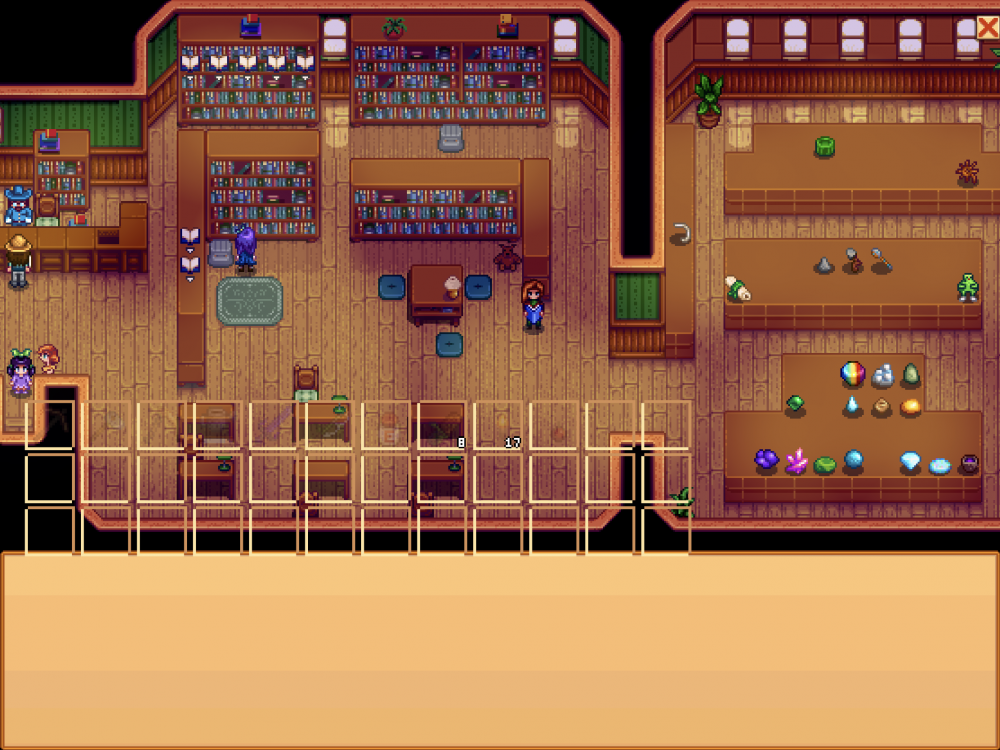
When I want to add new items to the museum, part of the screen with my inventory is higher than the actual screen for this, making it quite hard to see the items in my inventory.
I'm also not able to rearrange the items in the museum as it will not let me pick up most of the items to place them somewhere else.
There is no specific thing I did when these problems occur, they just happen everytime I go to the museum.
Twola
Greenhorn
Happens for me as well, usually when foraging. Hasn’t happen yet when mining, farming or fishing. Device: IPad Air 3rd GenerationDevice: iPad Pro 2nd gen, ios 15.7.2 , using a bluetooth controller.
Issue: Game freezes at random, requiring restarting the app and losing any unsaved progress. Tools can still be selected and certain animations like water ripples continue but time stops and no inputs are accepted. Happens most frequently while mining but also happens while doing anything else, always upon using a tool or picking up an item.
Chiefersoze
Tiller
Has this been fixed?
Smartphone Poco X3 Pro
Latest version (updated today)
Has this bug been fixed already, the "missing" item in the artifacts checklist even after completion, it's still missing on my list
Smartphone Poco X3 Pro
Latest version (updated today)
Has this bug been fixed already, the "missing" item in the artifacts checklist even after completion, it's still missing on my list
Attachments

- Status
- Not open for further replies.
Similar threads
- Replies
- 0
- Views
- 227

- Replies
- 0
- Views
- 259
- Replies
- 1
- Views
- 274

- Replies
- 2
- Views
- 3K

- Replies
- 0
- Views
- 333