
mo2cubing
Newcomer
My computer is a MacBook Pro (2019) with intel i7 chip running MacOS Sequoia 15.7.2.
I got Stardew Valley yesterday (2026/10/01). I'm on the latest version, with 1.6.15 and the latest Steam build.
I'm experiencing a bug that likely occurs because of the intended behavior of MacOS (when you hold down a key when typing for at least a split second, accent options for that key show up in the top-left, like àáâäǎæãåāăą).
Steps to reproduce:
1. Open Stardew Valley on Mac.
2. Hold down any arrow key that has possible accents, like W, A, S, R, E, etc., for at least 2 seconds.
Expected behavior: It will cause only in-game behavior such as moving or opening menus.
Actual behavior: It causes that in-game behavior while also making a system accent popup for whatever key show up in the top-left corner of the screen. It's extremely annoying and breaks the immersion for me.
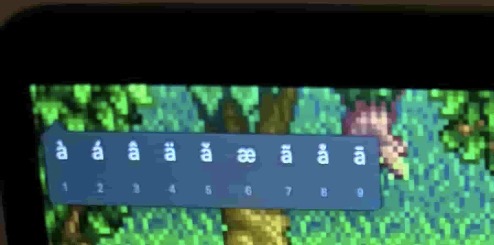
To make sure it wasn't just me, I looked online for a fix and couldn't find anything even after several searches, despite the fact many Mac users are likely experiencing this. Stardew Valley is the only game that I've experienced this problem with (Minecraft, Terraria, Flashpoint, etc. don't have this problem despite having keyboard keys for movement).
I did find the same problem in a post about Factorio however.
The only fix I found for this is running the following in Terminal:
`defaults delete -g ApplePressAndHoldEnabled`
But this is rather clunky. It would be nice to have a fix that does not require a terminal command.
I got Stardew Valley yesterday (2026/10/01). I'm on the latest version, with 1.6.15 and the latest Steam build.
I'm experiencing a bug that likely occurs because of the intended behavior of MacOS (when you hold down a key when typing for at least a split second, accent options for that key show up in the top-left, like àáâäǎæãåāăą).
Steps to reproduce:
1. Open Stardew Valley on Mac.
2. Hold down any arrow key that has possible accents, like W, A, S, R, E, etc., for at least 2 seconds.
Expected behavior: It will cause only in-game behavior such as moving or opening menus.
Actual behavior: It causes that in-game behavior while also making a system accent popup for whatever key show up in the top-left corner of the screen. It's extremely annoying and breaks the immersion for me.
To make sure it wasn't just me, I looked online for a fix and couldn't find anything even after several searches, despite the fact many Mac users are likely experiencing this. Stardew Valley is the only game that I've experienced this problem with (Minecraft, Terraria, Flashpoint, etc. don't have this problem despite having keyboard keys for movement).
I did find the same problem in a post about Factorio however.
[SOLVED][0.17.23] Accent menu popup (macOS)
Since the upgrade to 0.17 a new issue appeared while playing on mac. In macOS there's a feature called the accent menu where you can hold a key while focusin…
forums.factorio.com
The only fix I found for this is running the following in Terminal:
`defaults delete -g ApplePressAndHoldEnabled`
But this is rather clunky. It would be nice to have a fix that does not require a terminal command.