Need Help!

Emerrr

Newcomer
I just got my first PC windows a couple weeks ago and is trying to download mods but when I try it doesn't work! I've downloaded Sampi, pasted the thingy into Stardew valley and also downloaded content patcher. If someone could help me that would be amazing
((EDIT)) When I go into the game smapi says I have two mods, but I've doubled checked al the mods I've tried downloading and it wasn't any of them.
 
Last edited:
You initial message is vague about "pasted the thingy into Stardew valley and also downloaded content patcher". For the record, you do have 2 mods - the mods it's referring to are Console Commands and Save Backup, which are both "mods" that are used by SMAPI. So everything seems to be working, except your Content Patcher "download" isn't in the right spot to be picked up by SMAPI.

Your SMAPI Log doesn't show Content Patcher loading at all. Did you extra CP into your Mods folder?
 
What I meant was the text that Smapi makes you put in the stardew valley properties.

I believe I have. I put the extracted file into my mods folder than I turned it into a compressed zip file. Is that correct\should I take the folder file of the content patcher out of the mods folder because I already have the compressed zip file in there?
 
What I meant was the text that Smapi makes you put in the stardew valley properties.

I believe I have. I put the extracted file into my mods folder than I turned it into a compressed zip file. Is that correct\should I take the folder file of the content patcher out of the mods folder because I already have the compressed zip file in there?
The folder needs to be in the mods folder, not the compressed zip. SMAPI can't load zip files, it loads directories. So that's your problem. Put the Content Patcher folder inside the Mods folder, but DO NOT ZIP IT.
 
Alright, I put the NON zip folder into mods folder but when looking at the smapi log parser, it still doesn't show up (P.S. sorry for not responding in a while, I was away)
 
Alright, I put the NON zip folder into mods folder but when looking at the smapi log parser, it still doesn't show up (P.S. sorry for not responding in a while, I was away)
Can you provide the SMAPI Log? Hard to know what you mean when you say "looking at the parser, it doesn't show up".

Just to be clear about what needs to be done - Your mods directory should look something like:
  • Stardew Valley
    • Mods
      • ContentPatcher
        • config.json
        • ContentPatcher.dll
        • manifest.json
      • ConsoleCommands
        • ConsoleCommands.dll
        • manifest.json
      • SaveBackup
        • SaveBackup.dll
        • manifest.json
 
SMAPI log parser - SMAPI.io
1717368357617.png

this is what my folder looks like,
 
Last edited:
idk how to do this, I'm on here for a reason
Sorry I didn't reply sooner (that's why it's good to use the reply button, so we see a notification). I did give pretty detailed instructions in my last reply as to what your folder structure should look like. You should have a Stardew Valley folder (this folder will have the Stardew Valley.exe and StardewModdingAPI.exe inside) with a Mods folder inside it that contains folders that are the mods. Can't really make it any more simple than that.

For example, Content Patcher should have a folder structure that goes: Stardew Valley -> Mods -> Content Patcher.

To try a different way to explain this - find the folder that contains a folder called ConsoleCommands. Your Content Patcher mod folder would go into the same folder that contains ConsoleCommands.

Literally, it should look like this:
  • Mods
    • ConsoleCommands
    • Content Patcher
    • SaveBackup
 
Sorry I didn't reply sooner (that's why it's good to use the reply button, so we see a notification). I did give pretty detailed instructions in my last reply as to what your folder structure should look like. You should have a Stardew Valley folder (this folder will have the Stardew Valley.exe and StardewModdingAPI.exe inside) with a Mods folder inside it that contains folders that are the mods. Can't really make it any more simple than that.

For example, Content Patcher should have a folder structure that goes: Stardew Valley -> Mods -> Content Patcher.

To try a different way to explain this - find the folder that contains a folder called ConsoleCommands. Your Content Patcher mod folder would go into the same folder that contains ConsoleCommands.

Literally, it should look like this:Stardew Valley.exe
  • Mods
    • ConsoleCommands
    • Content Patcher
    • SaveBackup
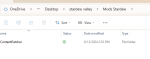
It's alright! I couldn't respond as well, away from the computer. I have made a folder called stardew valley and I've put stardew valley (the game, don't know if thats the same thing as the stardwe valley.exe, bc I couldn't find that), API, and the mods folder. Then put the content patcher in the mods folder. But still doesn't show up in my smapi log.
 

Attachments

  • Screenshot 2024-06-13 150241.png
    Screenshot 2024-06-13 150241.png
    11.5 KB · Views: 270
It's alright! I couldn't respond as well, away from the computer. I have made a folder called stardew valley and I've put stardew valley (the game, don't know if thats the same thing as the stardwe valley.exe, bc I couldn't find that), API, and the mods folder. Then put the content patcher in the mods folder. But still doesn't show up in my smapi log.
That's not quite what you need to do.

How to put this... You should have a folder on your computer that has the full set of Stardew Valley files in it. It should look something like the below image. Now mine has a couple extra folders (like Content (unpacked) and save-backups) that yours won't have. But there should be a folder with all of the files that Stardew Valley needs to run. This will be the same folder that you installed SMAPI into. In that folder, as you can see in my screenshot, you should have a Mods folder. In that folder, you should put the Content Patcher folder. Remember, not the zip, but the folder that came out of the zip.
1718323431497.png


You'll know you found the right folder because you should see the files in the following image within that folder:
1718323374412.png
 
Back
Top