
Android I can't copy the save file from android to pc

AyucukBaba

Newcomer
I stopped being able to copy my Stardew save file after making some changes. While trying to rename my child, I accidentally changed their name in the code directory—specifically, I only changed it for the day I last interacted with the child. I played like that for a few days, and when I realized my mistake, I tried to fix it. I transferred the file to Android but couldn't resolve the issue, so I ended up reverting to a save from one day prior and continued playing for quite a while. Right now, I can't copy the main save files using ZArchiver, Shuziki ADB, or even by connecting to a PC via USB; only the SVBAK and SVEMERG files can be copied.
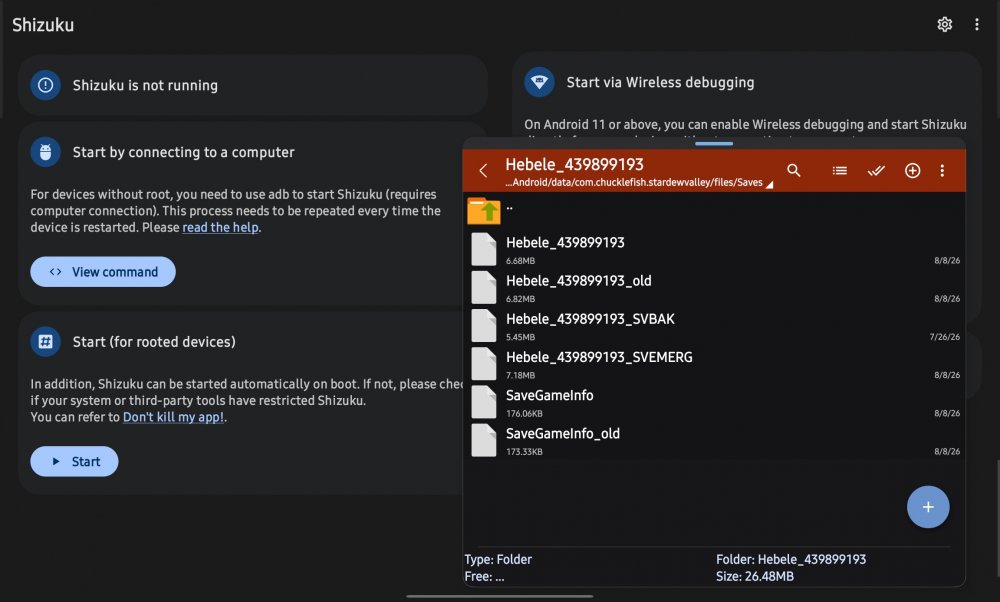
Screenshot_20260809_013359_ZArchiver.jpg
 
You can try making sure on PC that the main save files are not read-only, and then try copying from there? Then try to save it in an external folder in the phone, then use Shizuku to paste it back into the internal Saves folder.
 

AyucukBaba

Newcomer
You can try making sure on PC that the main save files are not read-only, and then try copying from there? Then try to save it in an external folder in the phone, then use Shizuku to paste it back into the internal Saves folder.
None of the files are read-only. The svbak and svemerg files can be opened correctly, but the other four files cannot be opened or copied even though their modification dates are recent.When I try to copy, I get a error that says "unspecified error"
 
None of the files are read-only. The svbak and svemerg files can be opened correctly, but the other four files cannot be opened or copied even though their modification dates are recent.When I try to copy, I get a error that says "unspecified error"
Just to make sure I'm understanding right, are you trying to copy from the phone to PC to edit then back to phone?

I tried just now using Shizuku, with wireless debugging. I copied the save into phone Documents, then from there I'd be able to upload that to cloud or copy to a pc. I've been able to do this by not copying in or pasting directly to the internal folder. It has to go through the phone. So from the chucklefish folder > somewhere in the phone's public storage > edit there or copy to pc.

Which android version do you have? It's harder on Android 16.
 

AyucukBaba

Newcomer
Since I'm using Android 16, I need either a USB connection or a Shizuki to access the files. I sent the file to my computer multiple times to edit it, but in the last change I made, I made the mistake I mentioned and I tried to correct it. But when it didn't fix it, I sent the mobile file again, the game started from the previous day, and I played like that for seasons. Now I want to edit the file again, but I can't open it or copy it anywhere. I can't copy them to my computer, nor to another folder on my mobile. Except for the two files I didn't copy to my computer, I'm making the mistake I mentioned. I didn't copy the svbak and svemerg files to my computer because I didn't need them. I currently don't have access to four of them except for these two, but the game opens and I can play it without any problems.
 
Top