

CamelliaGasStation
Cowpoke
HOW TO MOD ON ANDROID
Um, ackshually ☝ you press fewer buttons than on PC, so it's easier.
Um, ackshually ☝
you press fewer buttons than on PC, so it's easier.Modding on 1.6 is tapping a few buttons. Sometimes on SMAPI for Android, there can be a permission error, but the workaround is installing another app and pressing a few extra buttons. Sure you can use commands, but there's no need. On Cinderbox, this isn't a problem as the files are in the main visible storage.
As with any sort of modding, make sure to regularly back up your files.
Both guides assume you have no access to a PC.
SMAPI for Android by NRTnarathip
Community: SMAPI Thailand Discord server linked in NRTnarathip's Github and the SMAPI for Android Nexus page.
Frequently Asked Questions: https://rentry.org/Android-SMAPI-FAQ
What you need:
How to install:
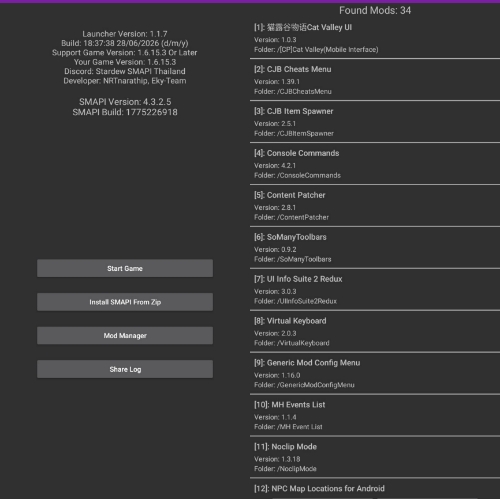
To upload your log, select Share Log. The version numbers are part of the text, making it easier to identify if something is outdated.
The SMAPI Launcher folder is named abc.smapi.gameloader and is found in the internal storage. You may need to use ADB to access it. There is a guide in the FAQ.
Must-have mods:
Common issues:
DO NOT CLEAR APP DATA/STORAGE. If you want to clean up space, clear the cache.
Frequently Asked Questions: https://rentry.org/Android-SMAPI-FAQ
What you need:
- A 64-bit Android device. You can try any 64-bit Android version.
- It doesn't work on Chromebook, sorry.
- Some devices can have 64-bit hardware with a 32-bit OS. If your device is like this, it will not work.
- If you use Huawei, it uses HarmonyOS. You can try GBox. We know of one person ever who was able to play with that, but it's been a while and there have been updates since, so no guarantees.
- Your legitimately purchased game from Play Store.
- The latest SMAPI Launcher from NRTnarathip's GitHub.
- The latest SMAPI for Android from Nexus Mods.
How to install:
- Install the SMAPI Launcher apk.
- Select Install SMAPI from Zip and select the SMAPI zip file starting with
SMAPI-Android. It has to be the file starting withSMAPI-Androidfrom Nexus Mods.
To upload your log, select Share Log. The version numbers are part of the text, making it easier to identify if something is outdated.
The SMAPI Launcher folder is named abc.smapi.gameloader and is found in the internal storage. You may need to use ADB to access it. There is a guide in the FAQ.
Must-have mods:
- Virtual Keyboard
- If you want to use commands, use the one by NRTnarathip on Github.
- If you have a mod that requires pressing buttons while a window or dialogue is open (like Portraiture), use the one by DoubleZ (user: zszs1452) on Nexus.
- If you need to do both, you can use SoManyToolbars by Ekyso on Nexus. However, note that your vanilla toolbar will be replaced. It cannot be used with another mod that edits the vanilla toolbar.
- Console Commands and Save Backup are not installed by default. You can get them in the SMAPI Thailand server.
- The mod isn't the same as the save backup feature on mobile, which lets you save midday. It backs up save files.
- Some mods have a special Android version. The FAQ has a list, but there are more in the SMAPI Thailand server.
Common issues:
- If you get a permission error that causes the launcher to not see the internal folder, use ADB. There is a guide in the FAQ.
- Do not touch the screen while it's loading at any point. The app will stop responding.
- If the app is not responding, do not tap "Wait". Close the app, clear cache and restart.
- Selecting "Wait" too often can delete all files. Don't do it.
- Yeah, the screen can go white during startup, that's normal. It can take a while too. Just wait.
- Do not manually install mods. Use the built-in Mod Manager in the app to install files. Installing manually can cause the files to not be detected.
What I do if I need to replace the config file or make edits is:- Add the edited file/s in a copy of the whole mod on an external folder.
- Zip up the folder and then install the edited zip.
- If you have any compressed file that's not in zip format, make it a zip. Extract the files, then compress to zip.
- Mods that change the UI are unlikely to work unless made specifically for Android.
- You cannot edit keybinds in-game. You need to edit the config.json manually, but do not use the device's stock text editor. Use an app like QuickEdit, Code Editor or a third-party file manager's text editor.
- ReShade is a PC program, not a SMAPI mod. While regular Content Patcher recolors work fine, ReShade files don't work. You can use Nightshade instead.
DO NOT CLEAR APP DATA/STORAGE. If you want to clean up space, clear the cache.
Cinderbox by Ekyso
Community: Cinderbox Discord server linked on Nexus, Github and my profile here. The link in the app will be fixed in a later version.
Frequently Asked Questions: https://github.com/Ekyso/Cinderbox/wiki/FAQ
What you need:
How to install:
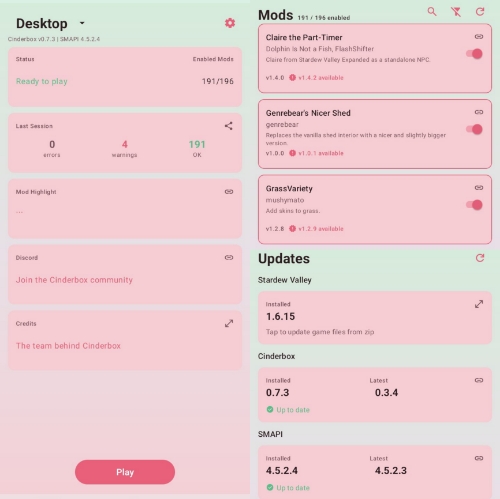
To upload your log, select Last Session. The version numbers are part of the text, making it easier to identify if something is outdated.
The Cinderbox folder is named StardewValley and found in the root (main public/external storage place) of your device. Just open your files and scroll down.
There are a few optimization options in the config.ini file in the
You can install using the Mods tab or manually. If a file isn't a zip, just extract them manually.
Must-have mods:
Common issues:
Yes, you can clear app data. You won't lose files. It's recommended when the app isn't detecting your updates.
Touching the screen while it's loading is fine.
Fun facts if you've only played the mobile version before:
Frequently Asked Questions: https://github.com/Ekyso/Cinderbox/wiki/FAQ
What you need:
- A 64-bit Android device running on Android 12 or higher.
- It hasn't been tested on Chromebook.
- Some devices can have 64-bit hardware with a 32-bit OS. If your device is like this, it will not work
- HarmonyOS 3 and 4 have been tested on older versions. Those can work too, but HarmonyOS 5 and higher will not. You can try GBox but I haven't heard of anyone trying Cinderbox there.
- Your legitimately purchased game from Steam or GOG.
- If you have the game on Steam, you can use the Cinderbox Companion app by ObfuscatedVoid, found on Github. You will have to login to your Steam account.
- If you have the game on GOG, you can use Winlator.
- The latest Cinderbox from Nexus Mods or the Cinderbox Discord server.
- If the Cinderbox app is from Nexus Mods, you can use the app to download SMAPI. Go to the Updates tab, select the SMAPI card and tap Download.
- If the Cinderbox app is from Discord, just download the SMAPI zip provided alongside it, go to the Updates tab, select the SMAPI card and tap Install from Zip.
How to install:
- Zip up all your own game files from PC and copy them to your phone.
- Install the Cinderbox apk.
- Follow the prompts in the app.
To upload your log, select Last Session. The version numbers are part of the text, making it easier to identify if something is outdated.
The Cinderbox folder is named StardewValley and found in the root (main public/external storage place) of your device. Just open your files and scroll down.
There are a few optimization options in the config.ini file in the
cinderbox-internal folder.You can install using the Mods tab or manually. If a file isn't a zip, just extract them manually.
Must-have mods:
- Virtual Keyboard
- The best one for Cinderbox is the special version of SoManyToolbars from the Discord server. It fixes some issues with the vanilla toolbar (which isn't made for touchscreen). However, it cannot be used with another mod that edits the toolbar.
- The one by DoubleZ (user: zszs1452) on Nexus is fine too.
- Console Commands and Save Backup are not installed by default. You can get them in the Cinderbox server, but they will be included in a later update.
- The mod isn't the same as the save backup feature on mobile, which lets you save midday. It backs up save files.
- If you use a controller or handheld and you want to remap the buttons, you can use LetMeRemap which can be found in the Cinderbox Discord server.
Common issues:
- If you get an initialization error, that's the files being wrong in some way.
- Delete the files (can be GameFiles, smapi-internal or cinderbox-internal)
- Clear app data.
- Open the app and follow the prompts.
- No sound can mean incomplete or outdated game files. Make sure to use Stardew's build 24356. On Steam, this is the latest one. The number is part of the pasted text when you upload your log using the app.
- Arcade games and the slot machine currently do not work on touch controls.
- ReShade is a PC program, not a SMAPI mod. While regular Content Patcher recolors work fine, ReShade files don't work. You can use Nightshade instead.
- Known mods that don't work: Clear Glasses, Wizardry, Walk of Life. Most mods work or mostly work.
Yes, you can clear app data. You won't lose files. It's recommended when the app isn't detecting your updates.
Touching the screen while it's loading is fine.
Fun facts if you've only played the mobile version before:
- No, you can't save midday unless you add a mod. We can use QuickSave.
- Yes, the horse really doesn't fit. Sad. You can use Pony Weight Loss Program.
- For auto-attack and tool switching, you can use AutoMeleeAttack and Tool Smart Switch.
Android is complicated for the device. In my experience, PC has more complexities for the user.
Ultimately, "which is easier?" can be answered by "what platform are you used to?"
Does this mod work? Try it. If the mod works, it works. Check if the Discord community for the launcher has something for it. If it doesn't work and has no alternative, leave it. It's likely not made for mobile.
Most of my experience in Stardew Valley, vanilla and modded, has been on mobile. This whole post was written and formatted on my phone. I am not very knowledgeable regarding technical things, but I will do my best to help if you have any questions.
Last edited:


