Solved Bugged Mod Save File Help?

napikuu

Greenhorn
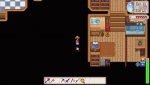
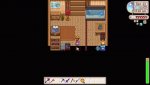
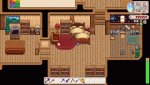
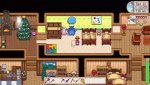
So I was adding some mods, (which I have alot of and if you need the mod list to help I'll send it to you). the only thing ive noticed so far that is bugged is my house, (i also did download this mod, bathroom mod if that helps) How this happened was I had an save with NO mods, and a save WITH mods, I got lazy and opened the one with NO mods, WITH mods, (sorry if thats confusing) and now the bed and walls are werid.

if I have to delete this save file or just live with it then :(

thank you tho!
 

Attachments

  • 20220216153456_1.jpg
    20220216153456_1.jpg
    141.9 KB · Views: 313
  • 20220216153410_1.jpg
    20220216153410_1.jpg
    74.5 KB · Views: 381
  • 20220216153405_1.jpg
    20220216153405_1.jpg
    63.4 KB · Views: 389
  • 20220216153357_1.jpg
    20220216153357_1.jpg
    132.4 KB · Views: 328
Well, the mod you linked has a bug section. And, a user named eeiko said they removed the mod, and verified their game files to fix this issue.

How to verify your game files:
(Links pulled from the modding wiki, but helpful for vanilla as well: https://stardewvalleywiki.com/Modding:Player_Guide/Troubleshooting#Reset_your_content_files)

Steam guide: https://help.steampowered.com/en/faqs/view/0C48-FCBD-DA71-93EB
GOG guide: https://support.gog.com/hc/en-us/articles/360003930017?product=gog

----
If you haven't tried that; do that. If it's still an issue; please post a SMAPI log: https://smapi.io/log
 
Back
Top