
sabre1234
Newcomer
Platform: PC (Steam), Windows 11
Game version: 1.6.15 (also reproduced on 1.6.14 via previous_version beta)
Mods: None — fully vanilla, verified files, clean reinstall, fresh save
Display: 3840×2160
Summary
Since 1.6 widened the Bus Stop map ("Now has a wider map (preventing black bars from appearing at the sides of the screen)" per the wiki changelog), the extra map art appears to be asymmetric relative to the camera's scroll bounds. On displays/zoom levels where the viewport is 60+ tiles wide, the location renders visibly off-center and the map's blank west-edge padding becomes visible. The title screen and interiors (e.g. farmhouse) center correctly — this is specific to how the Bus Stop map art sits relative to the camera area.
Repro steps
3840×2160, fullscreen or borderless (same result in all window modes).
Walk to the Bus Stop.
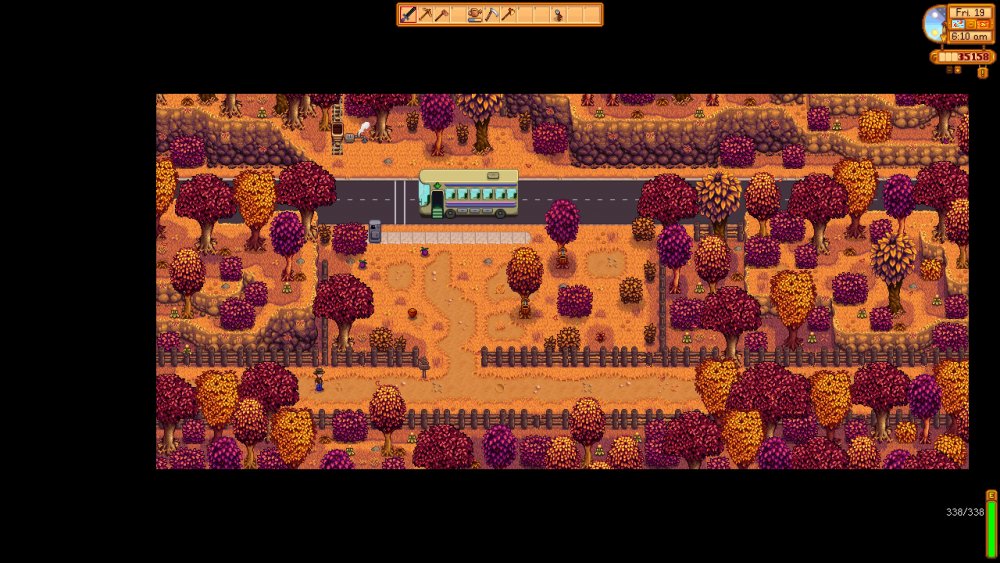
Set zoom to 75% → the map renders shifted right: measured black borders are 600px on the left vs 120px on the right (vertical borders are perfectly even at 360px top and bottom).
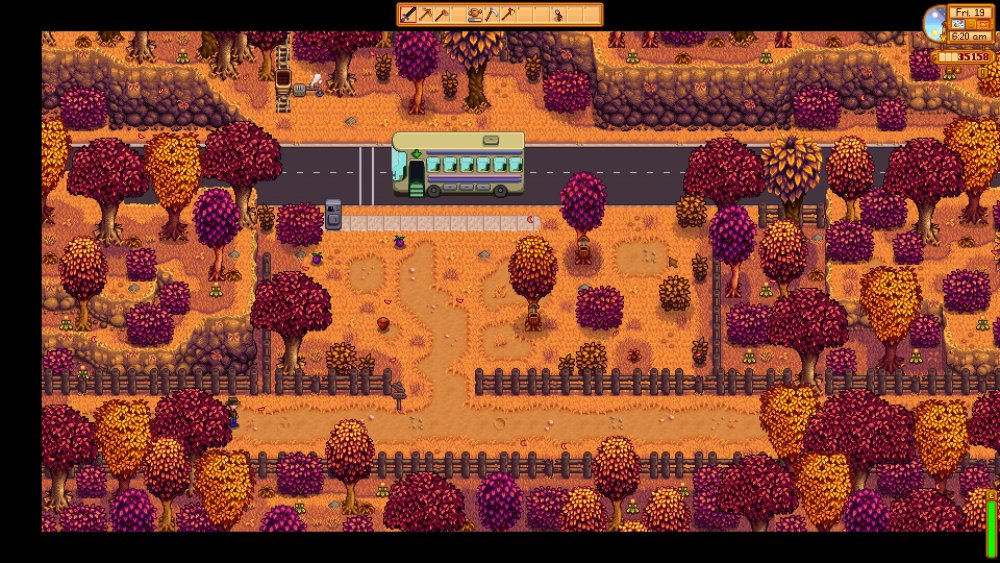
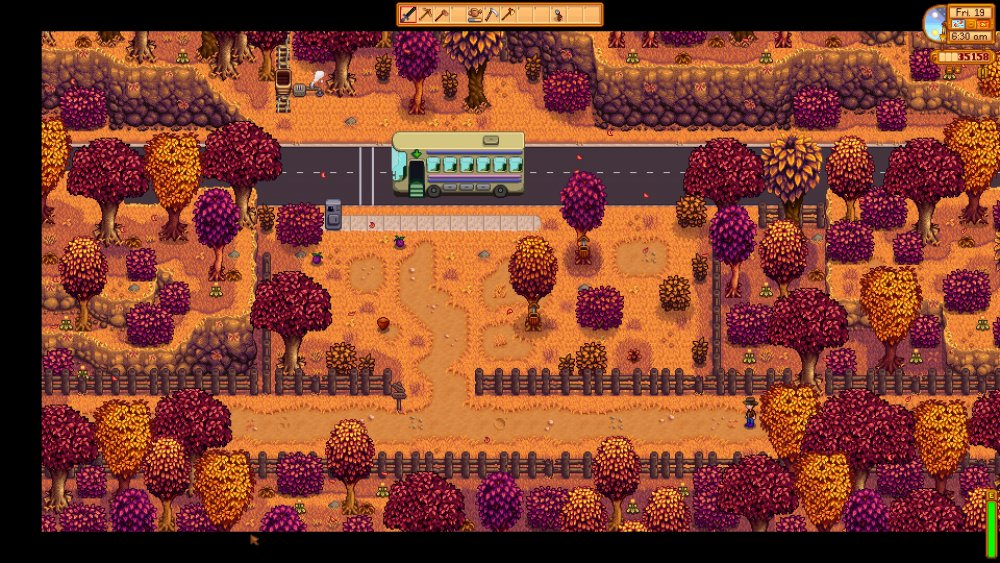
Set zoom to 100% → a 160px blank black strip (exactly 2.5 tiles) shows inside the map's west edge, and the camera does not scroll at all: standing at the far west end and the far east end of the map produces pixel-identical framing (screenshots attached).
Measurements (from lossless screenshots)
75% zoom, 4K: visible map art = 3120×1440px (65×30 tiles at 48px/tile). Vertical centering exact (360/360). Horizontal off by exactly 240px = 5 tiles (600 left / 120 right).
100% zoom, 4K: vertical centering exact (120/120). 160px (2.5-tile) blank strip at the west edge. Camera locked — no horizontal scrolling anywhere on the map.
The numbers are consistent with a camera/scroll area ~60 tiles wide anchored at the map's west edge, with the 1.6 decorative art extending ~5 tiles further east than west of that area. The camera centers correctly on its bounds; the artwork around it is what's asymmetric.
Why most players don't see it: at 1080p/1440p the viewport is narrower than the map art at all zoom levels, so the art fills the screen and the asymmetry is hidden. It only becomes visible at roughly 4K with zoom ≤ 100% (or equivalent viewport widths, e.g. ultrawide).
Expected: map art centered within the visible area when the viewport is wider than the map, with no blank map padding visible.
Actual: map shifted ~5 tiles east of center at 75% zoom; blank 2.5-tile strip visible at the west edge and fully static camera at 100% zoom.
Attachments: [screenshot: Bus Stop, 75% zoom, 4K] · [screenshot: 100% zoom, standing far west] · [screenshot: 100% zoom, standing far east — identical framing]
Game version: 1.6.15 (also reproduced on 1.6.14 via previous_version beta)
Mods: None — fully vanilla, verified files, clean reinstall, fresh save
Display: 3840×2160
Summary
Since 1.6 widened the Bus Stop map ("Now has a wider map (preventing black bars from appearing at the sides of the screen)" per the wiki changelog), the extra map art appears to be asymmetric relative to the camera's scroll bounds. On displays/zoom levels where the viewport is 60+ tiles wide, the location renders visibly off-center and the map's blank west-edge padding becomes visible. The title screen and interiors (e.g. farmhouse) center correctly — this is specific to how the Bus Stop map art sits relative to the camera area.
Repro steps
3840×2160, fullscreen or borderless (same result in all window modes).
Walk to the Bus Stop.
Set zoom to 75% → the map renders shifted right: measured black borders are 600px on the left vs 120px on the right (vertical borders are perfectly even at 360px top and bottom).
Set zoom to 100% → a 160px blank black strip (exactly 2.5 tiles) shows inside the map's west edge, and the camera does not scroll at all: standing at the far west end and the far east end of the map produces pixel-identical framing (screenshots attached).
Measurements (from lossless screenshots)
75% zoom, 4K: visible map art = 3120×1440px (65×30 tiles at 48px/tile). Vertical centering exact (360/360). Horizontal off by exactly 240px = 5 tiles (600 left / 120 right).
100% zoom, 4K: vertical centering exact (120/120). 160px (2.5-tile) blank strip at the west edge. Camera locked — no horizontal scrolling anywhere on the map.
The numbers are consistent with a camera/scroll area ~60 tiles wide anchored at the map's west edge, with the 1.6 decorative art extending ~5 tiles further east than west of that area. The camera centers correctly on its bounds; the artwork around it is what's asymmetric.
Why most players don't see it: at 1080p/1440p the viewport is narrower than the map art at all zoom levels, so the art fills the screen and the asymmetry is hidden. It only becomes visible at roughly 4K with zoom ≤ 100% (or equivalent viewport widths, e.g. ultrawide).
Expected: map art centered within the visible area when the viewport is wider than the map, with no blank map padding visible.
Actual: map shifted ~5 tiles east of center at 75% zoom; blank 2.5-tile strip visible at the west edge and fully static camera at 100% zoom.
Attachments: [screenshot: Bus Stop, 75% zoom, 4K] · [screenshot: 100% zoom, standing far west] · [screenshot: 100% zoom, standing far east — identical framing]