Solved [BUG] Indicators off-center when UI adjusted 1.5

I’ve come across some visual bugs while playing a new farm after 1.5 on the Switch.

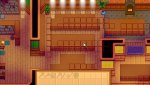
When donating my first item to the museum (I assume more will be too, but have only found one so far) all the placement indicators were misaligned.

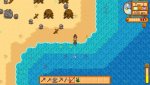
Also the indicators for a catch, max cast, etc. when fishing are to the right of the character, not over their head. This happened both on the farm and off of it, and when facing forward, back, and sideways.

Both of these happened on Day 2 of Spring, Year 1.

I chose the new beach farm, remixed community center and mines, and one year guarantee for the center.

EDIT: I also had the UI scaled to 115%, which appears to have been the cause. Once set back to 100% the fishing indicators were back to normal (have not yet had a chance to check the library).
 

Attachments
  • CF731576-4532-4F69-A5DE-C16749D3E131.jpeg
    CF731576-4532-4F69-A5DE-C16749D3E131.jpeg
    123.9 KB · Views: 814
  • 7690598E-4B61-426D-AF50-C7AC045D3B04.jpeg
    7690598E-4B61-426D-AF50-C7AC045D3B04.jpeg
    130.4 KB · Views: 774
Last edited:
This also affects building placement. Original report from Reddit:
I also happened to get the materials for one of the Obelisks, and placing them was... weird. The 2x3 grid didn’t line up with the cursor, and once I placed it, the final placement didn’t line up with the preview either. Is this a bug with the new update or something with changing UI size, since I did that as well.
 
I’ve come across some visual bugs while playing a new farm after 1.5 on the Switch.

When donating my first item to the museum (I assume more will be too, but have only found one so far) all the placement indicators were misaligned.

Also the indicators for a catch, max cast, etc. when fishing are to the right of the character, not over their head. This happened both on the farm and off of it, and when facing forward, back, and sideways.

Both of these happened on Day 2 of Spring, Year 1.

I chose the new beach farm, remixed community center and mines, and one year guarantee for the center.

EDIT: I also had the UI scaled to 115%, which appears to have been the cause. Once set back to 100% the fishing indicators were back to normal (have not yet had a chance to check the library).
I have this issue, with all placement indicators and building placement. My UI is at default (although my zoom is at 90).
 
I'm experiencing this issue as well on PS4 with the new update. Only seems to be happening when UI scale is adjusted. The greenhouse had an extra 2x3 space on either side of it when I tried to move it, fishing interactions are off center or half-off screen, and some reaction bubbles in cut scenes are misaligned.
 
this issue is fixed when UI Scale and Zoom are the same values.
museum and building placement is being affected by UI scale when they "should" be linked to zoom.
 
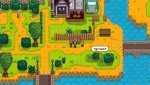
This is also a problem on Switch with speech bubbles. Zoomed fully out with UI at 100% scale.
 

Attachments

  • 2021021314474500-C2B49A475DF5A340494292A1BD398579.jpg
    2021021314474500-C2B49A475DF5A340494292A1BD398579.jpg
    194.3 KB · Views: 609
Back
Top