
Saholaris
Newcomer
Hello! This is my first time posting any coding issues, so if I'm missing anything just ask.
I'm working on a NPC mod and I want to add a new location, but of course I need a way to the location. I decided to add it to the town map and I'm running into two problems with my code. This is my first time making a mod and I've just been following the wiki and some tutorials. I've also been referencing another mod to help understand how and what things should look like within the JSON files. Before making any post I did try to find the answer through searching and I couldn't find anything that worked.
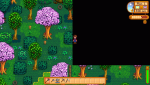
Anyways, my first big problem is that my map edit for the Town map won't replace the vanilla map. I've checked the ranges, the X, Y coords, and even restarted the entire map from scratch and it won't do anything. I saw a post from a while back saying that the references in the tmx were messed up so you have to edit it Notepad. I tried looking for that and found nothing amiss.My other problem is that when I do the "debug warp [LocationName]" I end up in my custom location, but when I exit (in the right location on the main map, although stuck in a forever warp loop when I move) it won't let me enter the custom location saying the the location wasn't found on SMAPI. It should be known that I tried messing around with the warp coords to see if that would help and it didn't.
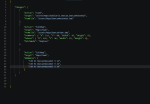
Both my Content Patcher and SMAPI are updated and I use Tiled. I made it so the only thing in the Maps folder are the tmx files and their JSON file so there's no problem with extra tilesheets. I'll provide a picture of the JSON file along with text of the same thing. I'll also provide a picture of the farmer stuck in the infinite warp.
SMAPI Log Link:
https://smapi.io/log/374e29ef07324ad7829bd5aa976ac655
Ignore the "Custom_Village" message, that was when I was messing around when I started modding and is irrelevant.
My files should be up to date with current Stardew, I just haven't changed the Format which I'm doing now.
Warp Values for the Custom Location:
9 22 Town 130 91 9 23 Town 130 92 9 24 Town 130 93
Map JSON File (for easier access):
NOTE: The content JSON includes this JSON when running. I know it runs, just not correctly
{
"Changes": [
{
"Action": "Load",
"Target": "assets/Maps/Saholaris.Duncan_DuncanHouseOut",
"FromFile": "assets/Maps/DuncanHouseOut.tmx"
},
{
"Action": "EditMap",
"Target": "Maps/Town",
"FromFile": "assets/Maps/DuncanTown.tmx",
"FromArea": { "X": 111, "Y": 88, "Width": 19, "Height": 9},
"ToArea": { "X": 129, "Y": 96, "Width": 19, "Height": 9},
"Patchmode": "Replace"
},
{
"Action": "EditMap",
"Target": "Maps/Town",
"AddWarps": [
"130 91 DuncanHouseOut 9 22",
"130 92 DuncanHouseOut 9 23",
"130 93 DuncanHouseOut 9 24"
]
}
]
}
I'm working on a NPC mod and I want to add a new location, but of course I need a way to the location. I decided to add it to the town map and I'm running into two problems with my code. This is my first time making a mod and I've just been following the wiki and some tutorials. I've also been referencing another mod to help understand how and what things should look like within the JSON files. Before making any post I did try to find the answer through searching and I couldn't find anything that worked.
Anyways, my first big problem is that my map edit for the Town map won't replace the vanilla map. I've checked the ranges, the X, Y coords, and even restarted the entire map from scratch and it won't do anything. I saw a post from a while back saying that the references in the tmx were messed up so you have to edit it Notepad. I tried looking for that and found nothing amiss.My other problem is that when I do the "debug warp [LocationName]" I end up in my custom location, but when I exit (in the right location on the main map, although stuck in a forever warp loop when I move) it won't let me enter the custom location saying the the location wasn't found on SMAPI. It should be known that I tried messing around with the warp coords to see if that would help and it didn't.
Both my Content Patcher and SMAPI are updated and I use Tiled. I made it so the only thing in the Maps folder are the tmx files and their JSON file so there's no problem with extra tilesheets. I'll provide a picture of the JSON file along with text of the same thing. I'll also provide a picture of the farmer stuck in the infinite warp.
SMAPI Log Link:
https://smapi.io/log/374e29ef07324ad7829bd5aa976ac655
Ignore the "Custom_Village" message, that was when I was messing around when I started modding and is irrelevant.
My files should be up to date with current Stardew, I just haven't changed the Format which I'm doing now.
Warp Values for the Custom Location:
9 22 Town 130 91 9 23 Town 130 92 9 24 Town 130 93
Map JSON File (for easier access):
NOTE: The content JSON includes this JSON when running. I know it runs, just not correctly
{
"Changes": [
{
"Action": "Load",
"Target": "assets/Maps/Saholaris.Duncan_DuncanHouseOut",
"FromFile": "assets/Maps/DuncanHouseOut.tmx"
},
{
"Action": "EditMap",
"Target": "Maps/Town",
"FromFile": "assets/Maps/DuncanTown.tmx",
"FromArea": { "X": 111, "Y": 88, "Width": 19, "Height": 9},
"ToArea": { "X": 129, "Y": 96, "Width": 19, "Height": 9},
"Patchmode": "Replace"
},
{
"Action": "EditMap",
"Target": "Maps/Town",
"AddWarps": [
"130 91 DuncanHouseOut 9 22",
"130 92 DuncanHouseOut 9 23",
"130 93 DuncanHouseOut 9 24"
]
}
]
}
Attachments
-
 468.6 KB Views: 142
 -
 722.6 KB Views: 150
Last edited: