
Khatarina
Greenhorn
This is driving me up the wall. I made a new more run-down farm, with a stream running through it, and I'm trying to set up events for the broken bridges on it, (like the beach bridge,) but I can't get the event to activate. I tried to find the actual beach event to look at, but can't find it anywhere in the unpacked files, and have been all over the various help pages. Here's a shot of the farm layout with the three bridges (and the swimming hole I'm trying to make too, once I get the swimsuit change tiles to activate, but that's another matter,) and the code from my content file. Can anybody see what probably dumb mistake I'm making?
file.
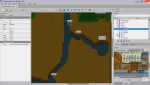
Code:
{
  "Format": "2.9.0",
  "Changes": [

      {
      "Action": "EditData",
      "Target": "Data/AdditionalFarms",
      "Entries": {
        "Khatarina.Abandoned": {
          "ID": "Khatarina.Abandoned",
          "TooltipStringPath": "Strings/UI:Khatarina_Abandoned",
          "MapName": "Khatarina_Abandoned",
          "IconTexture": "Mods/Khatarina.Abandoned/Icon"
          }
        }
    },

    {
      "Action": "EditData",
      "Target": "Strings/UI",
      "Entries": {
        "Khatarina_Abandoned": "Grandpa's Abandoned Farm_This farm's been almost completely reclaimed by nature.  It'll take a lot of work to fix it up."
      }
    },

    {
      "Action": "Load",
      "Target": "Maps/Khatarina_Abandoned",
      "FromFile": "assets/AbandonedFarm.tmx"
    },

    {
      "Action": "Load",
      "Target": "Mods/Khatarina.Abandoned/Icon",
      "FromFile": "assets/Icon.png"
    },

    {
      "Action": "Load",
      "Target": "Data/Events/Khatarina_Abandoned",
      "FromFile": "events.json"
    },

    {
      "Action": "EditData",
      "Target": "Data/Events/Khatarina_Abandoned",
      "Entries": {
        "{{ModID}}_Bridge1/!LocalMail Bridge1Fixed/hasItem 388 100": "continue/54 20/farmer 54 18 3/message \"There used to be a bridge here, but the water has washed it away.\"/question fork1 \"Do you want to use 100 pieces of wood to rebuild the bridge?#yes#no\"/fork Nofix/globalFade/viewport -1000 -1000/playSound hammer/removeItem 388 100/setmail Bridge1Fixed/pause 1000/fade/viewport 54 18/message \"There.  That's a good day's work.\"/end",
        "NoFix": "\"We'll worry about it later\"/end",
      "!LocalMail Bridge1Fixed": "message\"You need 100 pieces of wood to rebuild the bridge.\"/end"
      }
    },

    {
      "Action": "EditMap",
      "Target": "Maps/Khatarina_Abandoned",
      "When": {
      "HasFlag": "Bridge1Fixed"
      },
      "FromFile": "assets/bridgeh.tmx",
      "ToArea": { "X": 49, "Y": 17, "Width": 6, "Height": 3 }
    },

    {
      "Action": "EditData",
      "Target": "Data/Events/Khatarina_Abandoned",
      "Entries": {
        "{{ModID}}_Bridge2/!LocalMail Bridge2Fixed/hasItem 388 100": "continue/58 25/farmer 58 23 2/message \"This bridge is destroyed too.\"/question fork1 \"Do you want to use 100 pieces of wood to rebuild the bridge?#yes#no\"/fork Nofix/globalFade/viewport -1000 -1000/playSound hammer/removeItem 388 100/setmail Bridge2Fixed/pause 1000/fade/viewport 58 25/message \"That wasn't so hard.\"/end",
        "NoFix": "\"It's probably not that important\"/end",
      "!LocalMail Bridge2Fixed": "message\"You need 100 pieces of wood to rebuild the bridge.\"/end"
      }
    },

    {
      "Action": "EditMap",
      "Target": "Maps/Khatarina_Abandoned",
      "When": {
      "HasFlag": "Bridge2Fixed"
      },
      "FromFile": "assets/bridgev.tmx",
      "ToArea": { "X": 57, "Y": 23, "Width": 3, "Height": 6 }
    },

    {
      "Action": "EditData",
      "Target": "Data/Events/Khatarina_Abandoned",
      "Entries": {
        "{{ModID}}_Bridge3/!LocalMail Bridge3Fixed/hasItem 388 100": "continue/42 50/farmer 45 48 3/message \"Even the bits that are left of this one look rotten.\"/question fork1 \"Do you want to use 100 pieces of wood to rebuild the bridge?#yes#no\"/fork Nofix/globalFade/viewport -1000 -1000/playSound hammer/removeItem 388 100/setmail Bridge3Fixed/pause 1000/fade/viewport 42 50/message \"It looks good and strong.\"/end",
        "NoFix": "\"You can always just walk around to the other bridges.\"/end",
      "!LocalMail Bridge3Fixed": "message\"You need 100 pieces of wood to rebuild the bridge.\"/end"
      }
    },

    {
      "Action": "EditMap",
      "Target": "Maps/Khatarina_Abandoned",
      "When": {
      "HasFlag": "Bridge3Fixed"
      },
      "FromFile": "assets/bridgeh.tmx",
      "ToArea": { "X": 40, "Y": 47, "Width": 6, "Height": 3 }
    }
  ]
}
 You must replace the X/Y coordinates with the actual pet bowl tile location on your farm map.


