
Version: 0.1.19 | Author: MossHarbor | English / 简体中文
Download 0.1.19 ZIP / 下载 0.1.19 安装包
Nexus Mods | CurseForge | Source / 源码
Your farm’s production, in one place.
Crops in the greenhouse and on Ginger Island, kegs in sheds, casks in the cellar—check their production in one Progress tab in your existing game menu. See the product, progress and expected finish date without visiting each location.
What you can track
New in 0.1.19
Product icons now appear beside each row, and names are slightly darker for readability. The native Progress tab correctly handles mouse clicks and hover text when world zoom and UI scale differ. Solar Panels display “N sunny day(s) left”. Optional menu-input diagnostics are off by default.
This release includes the earlier menu compatibility fixes and optional Better Game Menu integration. The 0.1.19 update has completed in-game acceptance testing; the release build and automated checks passed.
Install or update
1. Install SMAPI for your game version.
2. Download ProductionProgress-0.1.19.zip using the direct link above or the Nexus Files page.
3. Close the game. Extract the complete ProductionProgress folder into Stardew Valley/Mods, replacing the old mod folder. Keep only one installed copy.
4. Launch through SMAPI, open your normal game menu and select the wheat-icon Progress tab.
Update both host and clients when using multiplayer views.
Compatibility
The native build retains the Stardew Valley 1.6.8 / SMAPI 4.0.8 baseline. Menu compatibility was also tested on Windows / Stardew Valley 1.6.15 / SMAPI 4.5.2, including the prepared Ultra Smooth 2.6.7 and SpaceCore 1.28.4 setup, with and without Better Game Menu. Other saves, large farms, other mod combinations and macOS/Linux have not been broadly verified. Multiplayer synchronization is implemented, but multiplayer and split-screen have not been verified in-game.
SMAPI is required. Better Game Menu 1.0.1+ is optional. The tested BGM 1.0.1 setup provides shared tab layout and overflow navigation, and resolves the tested UI Info Suite 2 Alternative settings/Exit overlap; that overlap remains in native mode. BGM 1.0.1 requires PC Stardew Valley 1.6.15+ and SMAPI 4.1.0+. Download optional mods separately. Content Patcher, Generic Mod Config Menu, Ultra Smooth and SpaceCore are not required.
A few details
Feedback and disclosure
For bugs, include game, SMAPI and mod versions, reproduction steps, a screenshot and a SMAPI log link. Mention other menu or machine-processing mods.
Code, translations and description were generated with AI following the author’s design and feedback. The author performed in-game testing. The mod does not call AI services while running. Screenshots below are actual game captures. The separate resource icon is AI-generated artwork.
简体中文
少跑几趟,集中查看农场生产进度。
作物分布在农场、温室和姜岛,酒桶放在棚屋,陈酿桶放在地下室。Production Progress 在原有游戏菜单中增加“进度”页签,集中查看产物、进度及预计完成日期,减少逐处检查的往返。
主要功能
0.1.19 更新内容
生产条目左侧新增产物图标,名称略微加深;修复世界缩放与 UI 缩放不一致时原生进度页签无法点击、悬停标题不出现的问题;太阳能板显示剩余有效晴天。新增的菜单输入诊断默认关闭。
同时包含此前的菜单兼容修复与可选 Better Game Menu 接入。本轮已完成游戏内验收,正式编译与自动检查通过。
安装与更新
1. 安装适合当前游戏版本的 SMAPI。
2. 点击页首“下载 0.1.19 安装包”,或到 Nexus 的 Files 页下载 ProductionProgress-0.1.19.zip。
3. 退出游戏,将 ZIP 内完整的 ProductionProgress 文件夹解压至 Stardew Valley/Mods,替换原文件夹,只保留一份。
4. 通过 SMAPI 启动游戏,打开原有菜单,选择麦穗“进度”页签。
多人视图请主机和客户端一起更新。
兼容与测试范围
原生模式保留 Stardew Valley 1.6.8 / SMAPI 4.0.8 构建基线。菜单兼容也已在 Windows / Stardew Valley 1.6.15 / SMAPI 4.5.2 下验证,包含已准备的 Ultra Smooth 2.6.7、SpaceCore 1.28.4 组合,并分别检查安装与不安装 Better Game Menu 的路径。其他存档、大型农场、其他 mod 组合及 macOS/Linux 尚未经大范围验证。多人同步已实现,但多人和分屏尚未实机验证。
SMAPI 必装,Better Game Menu 1.0.1+ 可选。已测试的 BGM 1.0.1 提供统一页签布局与左右翻页,并解决 UI Info Suite 2 Alternative 设置按钮和退出页签重叠;原生模式下该重叠仍存在。BGM 1.0.1 需要 PC 版游戏 1.6.15+、SMAPI 4.1.0+,需另行下载。无需安装 Content Patcher、Generic Mod Config Menu、Ultra Smooth 或 SpaceCore。
使用说明与限制
数量代表作物或机器个数,不是最终收获数量。作物日期以正常生长条件持续满足为前提;太阳能显示有效晴天数量,不预测未来天气或日历完成日。首次遇到未知完整周期的旧机器时可能没有百分比,旧太阳能周期仍可显示剩余晴天。完成后保留可靠记录的完成日期与 100%;没有历史记录时日期留空。
本 mod 不加速、不自动收取、不改变产物。深色菜单背景下打开信件时,进度页签图标可能比相邻图标更暗;完全替换菜单的 mod 可能需要专门适配。
反馈与开发说明
反馈时请提供游戏、SMAPI 和 mod 版本、复现步骤、截图及 SMAPI 日志链接,并说明其他菜单或机器加工类 mod。
代码、翻译与说明由 AI 按作者设计和反馈生成,作者完成实机测试。mod 运行时不调用 AI 服务。下方截图均来自真实游戏;独立资源图标为 AI 生成的宣传图案。
Screenshots / 实机截图
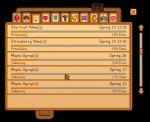
English — production list in 0.1.19

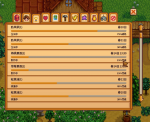
简体中文 — 0.1.19 生产列表

The two list screenshots show the released 0.1.19 UI. Only the window title bar was cropped; game content was not generated or repainted.
以上两张展示正式发布的 0.1.19 界面,仅裁掉窗口标题栏,未生成或重绘游戏内容。
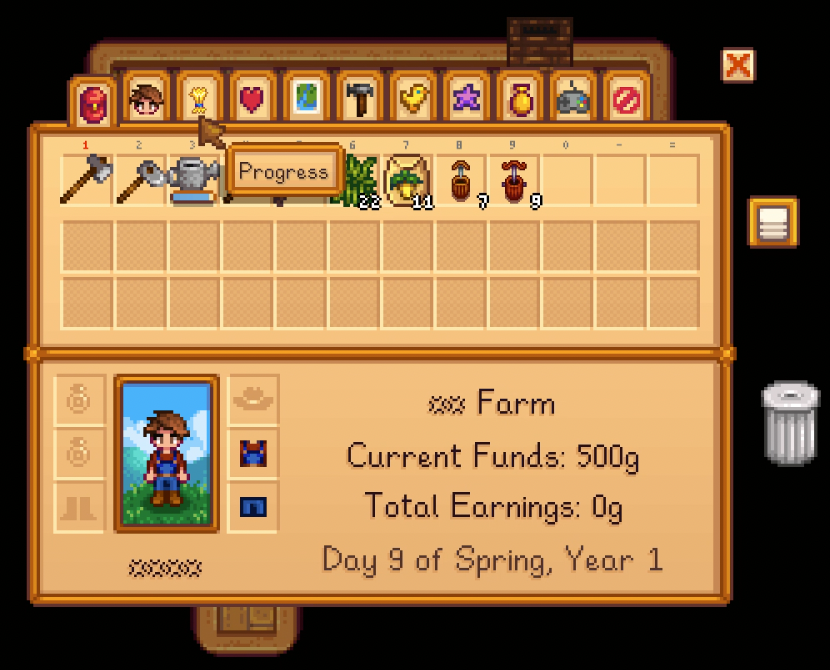
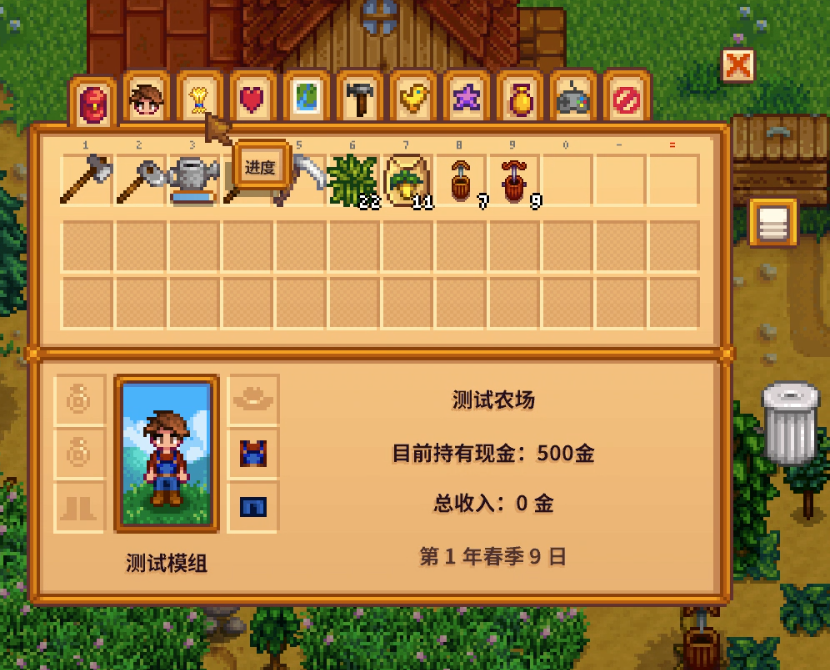
Menu entry / 菜单入口(earlier captures / 早期实机截图)
Download 0.1.19 ZIP / 下载 0.1.19 安装包
Nexus Mods | CurseForge | Source / 源码
Your farm’s production, in one place.
Crops in the greenhouse and on Ginger Island, kegs in sheds, casks in the cellar—check their production in one Progress tab in your existing game menu. See the product, progress and expected finish date without visiting each location.
What you can track
- Crop growth and regrowth, processing machines, tappers and cask quality stages.
- Native product icons, progress bars, production status and expected completion dates. Minute-based machines also show a time of day.
- Matching products, quality stages, work states and completion days group across locations. Staggered machines show the earliest batch and its share of the daily total; progress is not averaged.
- Solar Panels show remaining effective sunny days. Rain or indoor placement does not create false progress.
- Mouse scrolling, arrows, a draggable scrollbar and controller list navigation. Long names can be read by hovering.
- English and Simplified Chinese included, following your game language. No extra hotkey is required.
New in 0.1.19
Product icons now appear beside each row, and names are slightly darker for readability. The native Progress tab correctly handles mouse clicks and hover text when world zoom and UI scale differ. Solar Panels display “N sunny day(s) left”. Optional menu-input diagnostics are off by default.
This release includes the earlier menu compatibility fixes and optional Better Game Menu integration. The 0.1.19 update has completed in-game acceptance testing; the release build and automated checks passed.
Install or update
1. Install SMAPI for your game version.
2. Download ProductionProgress-0.1.19.zip using the direct link above or the Nexus Files page.
3. Close the game. Extract the complete ProductionProgress folder into Stardew Valley/Mods, replacing the old mod folder. Keep only one installed copy.
4. Launch through SMAPI, open your normal game menu and select the wheat-icon Progress tab.
Update both host and clients when using multiplayer views.
Compatibility
The native build retains the Stardew Valley 1.6.8 / SMAPI 4.0.8 baseline. Menu compatibility was also tested on Windows / Stardew Valley 1.6.15 / SMAPI 4.5.2, including the prepared Ultra Smooth 2.6.7 and SpaceCore 1.28.4 setup, with and without Better Game Menu. Other saves, large farms, other mod combinations and macOS/Linux have not been broadly verified. Multiplayer synchronization is implemented, but multiplayer and split-screen have not been verified in-game.
SMAPI is required. Better Game Menu 1.0.1+ is optional. The tested BGM 1.0.1 setup provides shared tab layout and overflow navigation, and resolves the tested UI Info Suite 2 Alternative settings/Exit overlap; that overlap remains in native mode. BGM 1.0.1 requires PC Stardew Valley 1.6.15+ and SMAPI 4.1.0+. Download optional mods separately. Content Patcher, Generic Mod Config Menu, Ultra Smooth and SpaceCore are not required.
A few details
- Counts represent tracked plants or machines, not the number of harvested items.
- Crop dates assume normal growth conditions continue. Solar estimates are effective sunny days, not a forecast of a calendar date.
- An already-running machine with no reliable cycle total may have no percentage until a new cycle is observed. Older solar cycles can still show remaining sunny days.
- Completed products retain their recorded finish date and 100% status; without a reliable historical record the date stays blank.
- The mod observes production. It does not accelerate growth, auto-harvest or change outputs.
- With dark menu backgrounds, the Progress tab icon may look darker while a letter is open. Full menu replacements may need dedicated support.
Feedback and disclosure
For bugs, include game, SMAPI and mod versions, reproduction steps, a screenshot and a SMAPI log link. Mention other menu or machine-processing mods.
Code, translations and description were generated with AI following the author’s design and feedback. The author performed in-game testing. The mod does not call AI services while running. Screenshots below are actual game captures. The separate resource icon is AI-generated artwork.
简体中文
少跑几趟,集中查看农场生产进度。
作物分布在农场、温室和姜岛,酒桶放在棚屋,陈酿桶放在地下室。Production Progress 在原有游戏菜单中增加“进度”页签,集中查看产物、进度及预计完成日期,减少逐处检查的往返。
主要功能
- 查看作物生长与再生、机器加工、树液采集和陈酿品质阶段。
- 显示原生产物图标、进度条、工作状态与预计完成日期;按分钟加工的机器同时显示完成时刻。
- 同产物、品质阶段、状态与完成日跨地点合并;错时投料显示最早批次及其占当日总数的数量,不取平均进度。
- 太阳能板显示“还需 N 个有效晴天”,雨天或室内暂停时不虚增进度。
- 支持鼠标滚轮、箭头、滑块拖动及手柄列表导航,长名称可以悬停查看。
- 同一个包内置中英文,跟随游戏语言,从原菜单进入,无需额外快捷键。
0.1.19 更新内容
生产条目左侧新增产物图标,名称略微加深;修复世界缩放与 UI 缩放不一致时原生进度页签无法点击、悬停标题不出现的问题;太阳能板显示剩余有效晴天。新增的菜单输入诊断默认关闭。
同时包含此前的菜单兼容修复与可选 Better Game Menu 接入。本轮已完成游戏内验收,正式编译与自动检查通过。
安装与更新
1. 安装适合当前游戏版本的 SMAPI。
2. 点击页首“下载 0.1.19 安装包”,或到 Nexus 的 Files 页下载 ProductionProgress-0.1.19.zip。
3. 退出游戏,将 ZIP 内完整的 ProductionProgress 文件夹解压至 Stardew Valley/Mods,替换原文件夹,只保留一份。
4. 通过 SMAPI 启动游戏,打开原有菜单,选择麦穗“进度”页签。
多人视图请主机和客户端一起更新。
兼容与测试范围
原生模式保留 Stardew Valley 1.6.8 / SMAPI 4.0.8 构建基线。菜单兼容也已在 Windows / Stardew Valley 1.6.15 / SMAPI 4.5.2 下验证,包含已准备的 Ultra Smooth 2.6.7、SpaceCore 1.28.4 组合,并分别检查安装与不安装 Better Game Menu 的路径。其他存档、大型农场、其他 mod 组合及 macOS/Linux 尚未经大范围验证。多人同步已实现,但多人和分屏尚未实机验证。
SMAPI 必装,Better Game Menu 1.0.1+ 可选。已测试的 BGM 1.0.1 提供统一页签布局与左右翻页,并解决 UI Info Suite 2 Alternative 设置按钮和退出页签重叠;原生模式下该重叠仍存在。BGM 1.0.1 需要 PC 版游戏 1.6.15+、SMAPI 4.1.0+,需另行下载。无需安装 Content Patcher、Generic Mod Config Menu、Ultra Smooth 或 SpaceCore。
使用说明与限制
数量代表作物或机器个数,不是最终收获数量。作物日期以正常生长条件持续满足为前提;太阳能显示有效晴天数量,不预测未来天气或日历完成日。首次遇到未知完整周期的旧机器时可能没有百分比,旧太阳能周期仍可显示剩余晴天。完成后保留可靠记录的完成日期与 100%;没有历史记录时日期留空。
本 mod 不加速、不自动收取、不改变产物。深色菜单背景下打开信件时,进度页签图标可能比相邻图标更暗;完全替换菜单的 mod 可能需要专门适配。
反馈与开发说明
反馈时请提供游戏、SMAPI 和 mod 版本、复现步骤、截图及 SMAPI 日志链接,并说明其他菜单或机器加工类 mod。
代码、翻译与说明由 AI 按作者设计和反馈生成,作者完成实机测试。mod 运行时不调用 AI 服务。下方截图均来自真实游戏;独立资源图标为 AI 生成的宣传图案。
Screenshots / 实机截图
English — production list in 0.1.19
简体中文 — 0.1.19 生产列表
The two list screenshots show the released 0.1.19 UI. Only the window title bar was cropped; game content was not generated or repainted.
以上两张展示正式发布的 0.1.19 界面,仅裁掉窗口标题栏,未生成或重绘游戏内容。
Menu entry / 菜单入口(earlier captures / 早期实机截图)