What does this dialog box icon in the friendship screen indicate?

Peckinpaw

Tiller
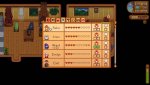
This is a screenshot from the Nintendo Switch game; not sure if the screen is the same in the PC game. I saw an older video by DangerouslyFunny where he appeared to click on this dialog box (outlined with yellow box in my screen shot), and it showed a list of gifts you had given that person. But, I think he might have been using a PC mod and it really had nothing to do with this box.
 

Attachments

  • Friendship screen.dialog box.jpg
    Friendship screen.dialog box.jpg
    93 KB · Views: 2,545
If you've talked to an NPC that day, there will be a green check mark in the box beneath the speech bubble.

Also, if you click on someone, you will be taken to a screen to see what gifts you have given them or otherwise know they love/like/neutral/dislike/hate (some folks tell you these things about others, and you find out more in other ways).
 
If you've talked to an NPC that day, there will be a green check mark in the box beneath the speech bubble.

Also, if you click on someone, you will be taken to a screen to see what gifts you have given them or otherwise know they love/like/neutral/dislike/hate (some folks tell you these things about others, and you find out more in other ways).

Thanks for the reply. I've tried clicking on someone, using the A button on the Switch controller, and nothing happens.
 
Well, I played last night and tried it again and it worked with the A button; just had to make sure I had nothing selected or a tool selected instead of another item like coffee.
 
Back
Top