iOS Cannot control

Thomas430

Greenhorn
1.6
ios(ipad)
cannot move
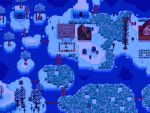
can only see picture attached below
restarted for some times but didn’t work
D49B2D58-EFB2-462A-863F-851FBCF6F163.png
 
Hi Stardew Valley staffs and players,
I met a problem and i hope you could hep me solve it.


•Issue: I “restored from where I previously left off”. After loading and entered the load, the game just showed the picture I attached below,
but i can’t either see my character or control anything(but can only zoom the view). I have tried to restart the game, enter the load for several times, but can’t solve the problem.
ps.i don’t know the reason but i can’t upload my save file . I can only upload a .zip file(maybe because of my ios version)

•System:iOS15.8.3(iPad mini 4)
•Game Version:v1.6.15
•Language:English
•Game Mode:singleplayer

 

Attachments

Can you upload your save file here? Someone might be able to help you fix it.
sorry but could you please give me a guidance on how to upload my save file(ios15 ipad)
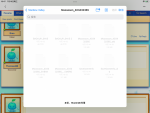
before this when i tried to attach my load save the page was like the picture below
and i can’t choose any file to be attached
 

Attachments

  • BAF79245-22D0-4A17-AC23-B9F273DC9DAC.png
    BAF79245-22D0-4A17-AC23-B9F273DC9DAC.png
    313.6 KB · Views: 270
Last edited:
Update: I didn’t choose to start from where i previously left then the game restarts at the point when the bug hadn’t happened. Then things went regularly
But i still want to know
1.how to prevent issue like this happen again
2.what should i do in case of this issue
 
Update: I didn’t choose to start from where i previously left then the game restarts at the point when the bug hadn’t happened. Then things went regularly
But i still want to know
1.how to prevent issue like this happen again
2.what should i do in case of this issue
The option to save the game in the middle of the day is not perfect; sometimes issues like this happen. If it happens again, you'll have to select No and replay the day from the beginning.
 
Back
Top