
iOS Cannot retrieve item from lost and found
- Thread starter Strdw11
- Start date
-
- Tags
- #lostandfound

fierfaerie
Greenhorn
My hoe fell into the lost box, and I click to retrieve but it does not go into inventory, it's right back in the box. I can't get it out of the box. (This is also related to a different issue where things in inventory keep getting missing if you're holding them and you get some other item, the thing you are holding disappears. If it is a tool it will pop up in the lost and found. However for the hoe I cannot get it out.)

aishasfarm
Greenhorn
Yeah same here. Playing on ipad then suddenly lost my scythe but can't take it out of the Mayor's lost and found box.
Dewdrop_farms
Greenhorn
Same bug on my iPad. I’ve tried retrieving my items after the fall festival and though I can see and click them within the lost and found box, they don’t transfer into my inventory.


StoneryKitty
Newcomer
I'm having the same problem on Android :/

MapleGreen
Greenhorn
Same here lost my pick axe!! Gahhh cant play now 
Shadypaddock
Newcomer
I have this issue with some items. When i click the items they dissappear from the box, but they dont go into my inventory and when i go back into the lost and found they appear there. Have tried many times and different days and closed and reoped the game but still the same issue.
1.6.14.3 update with android.
1.6.14.3 update with android.
mewsubi
Developer
@Strdw11 @fierfaerie @aishasfarm @Baggana @Dewdrop_farms @Klaine @Misty @louzz @StoneryKitty @MapleGreen @Shadypaddock
Hey all!
Just wanted to let you know that we on the dev team are aware of the issue, and have actively been looking to fix it for upcoming mobile patches.
A couple things to help us out with the issue:
1. Are you using any Item ID glitches in your name? (i.e. [434] or the like?)
2. Can you upload the affected save file? Use the built-in Files app, and go to "On my iPhone" in the sidebar. Then, navigate to
Thanks for your patience, and I hope we can resolve the issue as soon as possible.
Hey all!
Just wanted to let you know that we on the dev team are aware of the issue, and have actively been looking to fix it for upcoming mobile patches.
A couple things to help us out with the issue:
1. Are you using any Item ID glitches in your name? (i.e. [434] or the like?)
2. Can you upload the affected save file? Use the built-in Files app, and go to "On my iPhone" in the sidebar. Then, navigate to
StardewValley -> FarmName_123456789, where FarmName_123456789 is the name of your farm, with some numbers at the end. If you can zip up that folder and upload it here, that'll help us out with being able to test the fixes.Thanks for your patience, and I hope we can resolve the issue as soon as possible.

avivoir
Greenhorn
Here is my Android save file, hopefully I zipped it up right. Apparently, the items from my grange display are stuck in the Lost and Found box, and should include mayo, triple shot espresso, large egg, angler, diamond, pale ale, red cabbage, cranberries, and hazelnut. I can't get any of these items out. :(
@Strdw11 @fierfaerie @aishasfarm @Baggana @Dewdrop_farms @Klaine @Misty @louzz @StoneryKitty @MapleGreen @Shadypaddock
Hey all!
Just wanted to let you know that we on the dev team are aware of the issue, and have actively been looking to fix it for upcoming mobile patches.
A couple things to help us out with the issue:
1. Are you using any Item ID glitches in your name? (i.e. [434] or the like?)
2. Can you upload the affected save file? Use the built-in Files app, and go to "On my iPhone" in the sidebar. Then, navigate toStardewValley -> FarmName_123456789, whereFarmName_123456789is the name of your farm, with some numbers at the end. If you can zip up that folder and upload it here, that'll help us out with being able to test the fixes.
Thanks for your patience, and I hope we can resolve the issue as soon as possible.
Attachments
-
152 bytes Views: 276
aishasfarm
Greenhorn
I was using code 434 for a while then glitches suddenly happened.@Strdw11 @fierfaerie @aishasfarm @Baggana @Dewdrop_farms @Klaine @Misty @louzz @StoneryKitty @MapleGreen @Shadypaddock
Hey all!
Just wanted to let you know that we on the dev team are aware of the issue, and have actively been looking to fix it for upcoming mobile patches.
A couple things to help us out with the issue:
1. Are you using any Item ID glitches in your name? (i.e. [434] or the like?)
2. Can you upload the affected save file? Use the built-in Files app, and go to "On my iPhone" in the sidebar. Then, navigate toStardewValley -> FarmName_123456789, whereFarmName_123456789is the name of your farm, with some numbers at the end. If you can zip up that folder and upload it here, that'll help us out with being able to test the fixes.
Thanks for your patience, and I hope we can resolve the issue as soon as possible.
Attachments
-
707.3 KB Views: 199
mewsubi
Developer
There is no save data inside the zip file attached, but that's alright! Please update to 1.6.14.7 and let me know if you still can't get the items out.Here is my Android save file, hopefully I zipped it up right. Apparently, the items from my grange display are stuck in the Lost and Found box, and should include mayo, triple shot espresso, large egg, angler, diamond, pale ale, red cabbage, cranberries, and hazelnut. I can't get any of these items out. :(
mewsubi
Developer
This save appears to be from 1.6.14.3, I recommend updating to 1.6.14.7 which released earlier today, and should fix these issues. Let me know if you still can't get the items out after updating!I was using code 434 for a while then glitches suddenly happened.
aishasfarm
Greenhorn
I can get the items out now! But after my name was mentioned, one of the tools got replaced by item 434, so the tool is lost againThis save appears to be from 1.6.14.3, I recommend updating to 1.6.14.7 which released earlier today, and should fix these issues. Let me know if you still can't get the items out after updating!
Last edited:
Lemon Drop
Tiller
mewsubi, I don't know if this will help or not, but I have 3 different versions of SDV on 3 different iPads. (I have a lot of old iPads. ) They are:
1.5.6 build 39
1.6.14 build 24317
1.6.14.7 build 24334
I started new (test) games on them the other day, and one difference that really popped out to me was that on the 1.5 game when an NPC said my name [74][434][645] most of it was shown onscreen, but in both the 1.6 versions there were just blank spaces. I don't know if that's relevant or not. (Screenshots attached.)
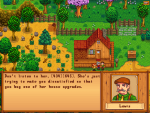
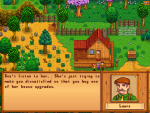
In the first two pics I'm just showing the difference between 1.5 and 1.6 during the initial cutscene. All the conversation from Lewis and Robin looks like this.
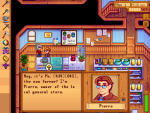
The 3rd picture is 1.5 after Pierre has interacted with me. Notice I ended up with 3 stardrops and my axe. (Red shirt.)
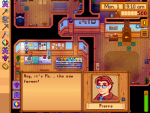
The 4th and 5th pics are 1.6.14. On this game I was forced to eat 2 stardrops, ending up with one stardrop and no axe. (White shirt.)
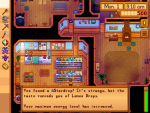
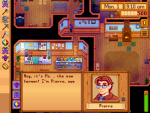
The 6th pic is 1.6.14.7. After interacting with Pierre on this game, I ended up with 2 stardrops (but in 2 different slots - they would normally stack) and no axe. (Purple shirt.)
Note: I was able to retrieve my axe from lost and found in both my 1.6 games.
Prior to 1.5, item codes worked perfectly; didn't have to worry about them at all.
With 1.5, if any item was highlighted in a slot when an NPC said your name, you'd lose that item (unless you already had a stardrop in your backpack, in which case it'd just usually get added to that slot). This also happened if you walked into a cutscene where someone spoke your name. If you could figure out how to get the item codes to work like prior to 1.5, that would be great...but I'd settle for just getting them to work like 1.5, lol.
Thank you again for all your hard work, mewsubi.
 I was just going to quit using item codes in my name, but since you seem to be working on it, I thought these screenshots might help.
) They are:1.5.6 build 39
1.6.14 build 24317
1.6.14.7 build 24334
I started new (test) games on them the other day, and one difference that really popped out to me was that on the 1.5 game when an NPC said my name [74][434][645] most of it was shown onscreen, but in both the 1.6 versions there were just blank spaces. I don't know if that's relevant or not. (Screenshots attached.)
In the first two pics I'm just showing the difference between 1.5 and 1.6 during the initial cutscene. All the conversation from Lewis and Robin looks like this.
The 3rd picture is 1.5 after Pierre has interacted with me. Notice I ended up with 3 stardrops and my axe. (Red shirt.)
The 4th and 5th pics are 1.6.14. On this game I was forced to eat 2 stardrops, ending up with one stardrop and no axe. (White shirt.)
The 6th pic is 1.6.14.7. After interacting with Pierre on this game, I ended up with 2 stardrops (but in 2 different slots - they would normally stack) and no axe. (Purple shirt.)
Note: I was able to retrieve my axe from lost and found in both my 1.6 games.
Prior to 1.5, item codes worked perfectly; didn't have to worry about them at all.
With 1.5, if any item was highlighted in a slot when an NPC said your name, you'd lose that item (unless you already had a stardrop in your backpack, in which case it'd just usually get added to that slot). This also happened if you walked into a cutscene where someone spoke your name.
If you could figure out how to get the item codes to work like prior to 1.5, that would be great...but I'd settle for just getting them to work like 1.5, lol.Thank you again for all your hard work, mewsubi.
I was just going to quit using item codes in my name, but since you seem to be working on it, I thought these screenshots might help.Attachments
-
 1 MB Views: 217
 -
 1 MB Views: 195
 -
 562.2 KB Views: 201
 -
 705.6 KB Views: 245
 -
 749.5 KB Views: 262
 -
 712.7 KB Views: 215
Last edited:
mewsubi
Developer
Thanks! This is a pretty helpful breakdown, I'll see what can be done.mewsubi, I don't know if this will help or not, but I have 3 different versions of SDV on 3 different iPads. (I have a lot of old iPads.
1.5.6 build 39
1.6.14 build 24317
1.6.14.7 build 24334
I started new (test) games on them the other day, and one difference that really popped out to me was that on the 1.5 game when an NPC said my name [74][434][645] most of it was shown onscreen, but in both the 1.6 versions there were just blank spaces. I don't know if that's relevant or not. (Screenshots attached.)
In the first two pics I'm just showing the difference between 1.5 and 1.6 during the initial cutscene. All the conversation from Lewis and Robin looks like this.
The 3rd picture is 1.5 after Pierre has interacted with me. Notice I ended up with 3 stardrops and my axe. (Red shirt.)
The 4th and 5th pics are 1.6.14. On this game I was forced to eat 2 stardrops, ending up with one stardrop and no axe. (White shirt.)
The 6th pic is 1.6.14.7. After interacting with Pierre on this game, I ended up with 2 stardrops (but in 2 different slots - they would normally stack) and no axe. (Purple shirt.)
Note: I was able to retrieve my axe from lost and found in both my 1.6 games.
Prior to 1.5, item codes worked perfectly; didn't have to worry about them at all.
With 1.5, if any item was highlighted in a slot when an NPC said your name, you'd lose that item (unless you already had a stardrop in your backpack, in which case it'd just usually get added to that slot). This also happened if you walked into a cutscene where someone spoke your name.
Thank you again for all your hard work, mewsubi.
Lemon Drop
Tiller
You're welcome! Let me know if there's anything else you'd like me to test.Thanks! This is a pretty helpful breakdown, I'll see what can be done.