

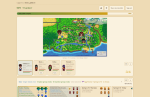
A companion mod for SDV Tracker, a web checklist for 100% completion. At the end of each in-game day it pushes what you have finished to your tracker account, so the checklist keeps itself instead of you ticking boxes by hand. While you play, it draws you and everyone else on the farm on a live map.
Check out the LIVE DEMO to get an idea of how it works. Playing with Stardew Valley Expanded or Ridgeside Village? There is a modded demo too.
This mod does nothing on its own. It needs a free account at sdv.fullclear.io - the mod carries a token from that account and has nowhere to send anything without one. If you are looking for an in-game overlay, this is not that. The checklist website can be used manually if on a platform with no mod support.
What the tracker gives you
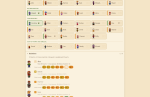
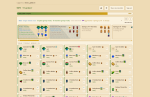
- One list for everything. The museum, every fish, all the bundles, crafting and cooking recipes, all 130 golden walnuts, heart events and villagers. Items are sorted, with where and when each thing comes from, and the commonly-missed ones flagged.
- Content mods. Stardew Valley Expanded and Ridgeside Village have their own packs: their villagers, gifts, heart events, fish, crops and recipes join the list, and their villages are on the map. The mod tells the tracker which of them your game runs, so a farm without them never sees their rows.
- Co-op. Stardew keeps a whole co-op farm in the host's save, so farmhands have no save of their own. The host's sync fills in everyone; each farmer gets their own column and every row shows who has done what.
- A live world map. While you are playing it draws where everyone on the farm is standing - every farmer, every villager and your horse - across the valley, Ginger Island and the mods' own maps.
- The week ahead. Crops and machines coming ready, fruit trees, fish ponds, tappers and casks, what Robin is building and when, the tool you left with Clint, the weather, festivals, birthdays and what the Queen of Sauce is teaching - from your actual save, not a generic calendar.
- A gift tracker that knows who you have given to this week, and what each villager loves.
- Read-only share links you can post anywhere. They carry no password, no token and no risk.
What the mod sends
Never your save file. The mod reads the loaded game in memory and sends derived facts only. Specifically:
- At the end of each day: which checklist items are done; what is planted and when it ripens; what your machines, casks, tappers, fruit trees and fish ponds are making; what Robin is building; a tool left with Clint; your gift cooldowns; your skill levels and professions; your farmer's name, appearance (hat included) and what you are wearing and carrying, so the site can draw your character sheet; a few numbers from the stats screen such as money earned, time played and how deep you have been in the mines; a short list of the farm's story flags (the vault, the Community Center, the bridge), which is how the site works out where each villager is that day; and which supported content mods are loaded. On a co-op farm the host sends the same for each farmhand.
- While you play, if you leave it on: your location and position, health and stamina, the in-game clock, what you are holding and your inventory - and, from the host, where every villager is standing. This is what draws the live map. It is never stored. The server keeps it in memory for two minutes and forgets it. Set StreamLiveState to false to forbid sending live data and stick to save file imports.
Installing
- Install SMAPI 4.0.0 or newer.
- Make a free account at sdv.fullclear.io.
- Unzip this into Stardew Valley/Mods/.
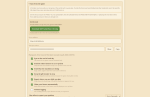
- On the tracker, open Co-op Party → Sync from the game and press Download config.json. Your server address and your account's token are already in the file.
- Drop that file into Stardew Valley/Mods/SdvTrackerSync/, replacing the one the mod wrote for itself.
- Load your save. The first sync happens when you go to bed, or run sdvtracker_sync in the SMAPI console to do it now.
The same box on the tracker shows last synced, so you can tell at a glance whether it is working.
Settings
All in Mods/SdvTrackerSync/config.json. The tracker fills this in for you; these are what the switches mean.
- ServerUrl - your tracker. Defaults to .
- Token - your account's sync token.
- SyncOnDayEnd (true) - sync when the day ends. Off means the console command only.
- SyncFarmhands (true) - send the other farmers on a co-op farm. Only the host can.
- SyncProducers (true) - machines, casks, tappers, fruit trees and fish ponds, and when each can be collected.
- SyncGifts (true) - keep the gift tracker in step.
- StreamLiveState (true) - report where you are while you play. Off and the map never shows you.
- AutoBind (true) - claim your farmer automatically on a farm you have joined.
- VerboseLogging (false) - for working out why a sync did not do what you expected.
The tracker sets the pace of the live feed itself; an old LiveIntervalMs key in the file is ignored.
Console commands
- sdvtracker_sync - push now, instead of waiting for the day to end.
- sdvtracker_reload - re-read config.json without restarting.
- sdvtracker_live - say whether the live feed is running and who this game speaks for.
- sdvtracker_bind - on a farm you have joined, say which farmer you are playing.
Multiplayer
The host should install it. Stardew only saves the game on the host's computer, so the host's sync is the only thing that can see every farmer's progress, and only the host's game reports the villagers. Farmhands do not need it, though installing it does add live position for that player and lets them claim their own farmer automatically.
Compatibility
- Stardew Valley 1.6+, SMAPI 4.0.0+
- Windows, macOS, Linux
- Single player and multiplayer
- Stardew Valley Expanded and Ridgeside Village are supported with their own content on the tracker. Other content mods work too: their items show by name, and villagers the tracker has no pack for are still listed and drawn.
- No known conflicts. This mod does not patch the game. It only reads state and makes web requests.
Keeping it current: the tracker tells you in Sync from the game when your install is behind the build it ships, and the mod logs a SMAPI warning once per loaded save if there is a newer one. Some of the newer items above - content mods, buildings, ponds - need an up-to-date tracker; against an older server the mod simply sends what that server understands.
Uninstalling
Delete Mods/SdvTrackerSync/. Nothing is written to your save and nothing changes in-game, so the save is untouched either way. Your tracker account and everything on it stay exactly as they were; you can go back to ticking by hand or importing a save file on the website.